Dale k wobsahej
WordPress.org

Hornjoserbšćina

  • Drasty
  • Tykače
  • Wo
  • Get WordPress
Get WordPress
WordPress.org

Plugin Directory

WP ShareX

  • Submit a plugin
  • My favorites
  • Log in
  • Submit a plugin
  • My favorites
  • Log in

Tutón tykač njeje so z najnowšimi 3 hłownymi wersijemi WordPress testował. Snano so hižo njewothladuje abo njepodpěruje a ma problemy z kompatibelnosću, hdyž so z nowšimi wersijemi WordPress wužiwa.

WP ShareX

Wot joomdev
Sćahnyć
  • Podrobnosće
  • Pohódnoćenja
  • Instalacija
  • Wuwiće
Podpěra

Wopisanje

WP ShareX is an advanced WordPress Social Share plugin enables you to add social share buttons on Posts and pages. You can assign buttons on Top of the Content, Bottom of the Content, Sidebar and on media.

Features of WP Social Share by JoomDev
1. 24 Social Network
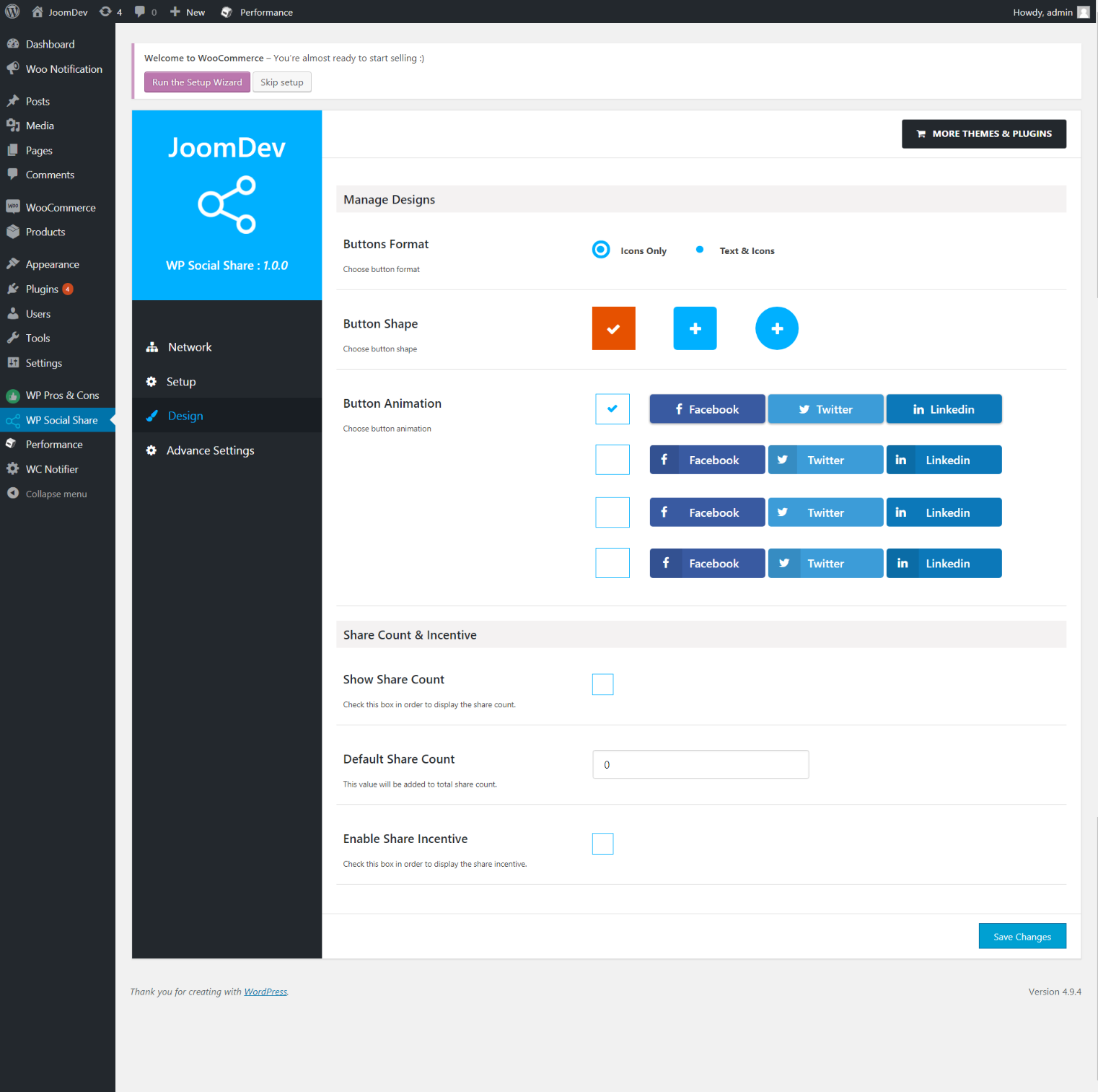
2. You have the option to select either Icons or Icons with Text
3. 3 Button Shapes
4. 4 Button Animations
5. URL Shortening Option with Bitly and Goo.gl
6. Embed Twitter Handle and desired tags with Tweet
7. 4 Button display Location e.i. Top of the Content, Bottom of the content, Media, and Sidebar
8. Hide On Mobile Ability
9. Default Share Count Option. (You can play with your user’s mind)
10. Encourage your Audience to share your content with Share Incentive Feature

Fota wobrazowki
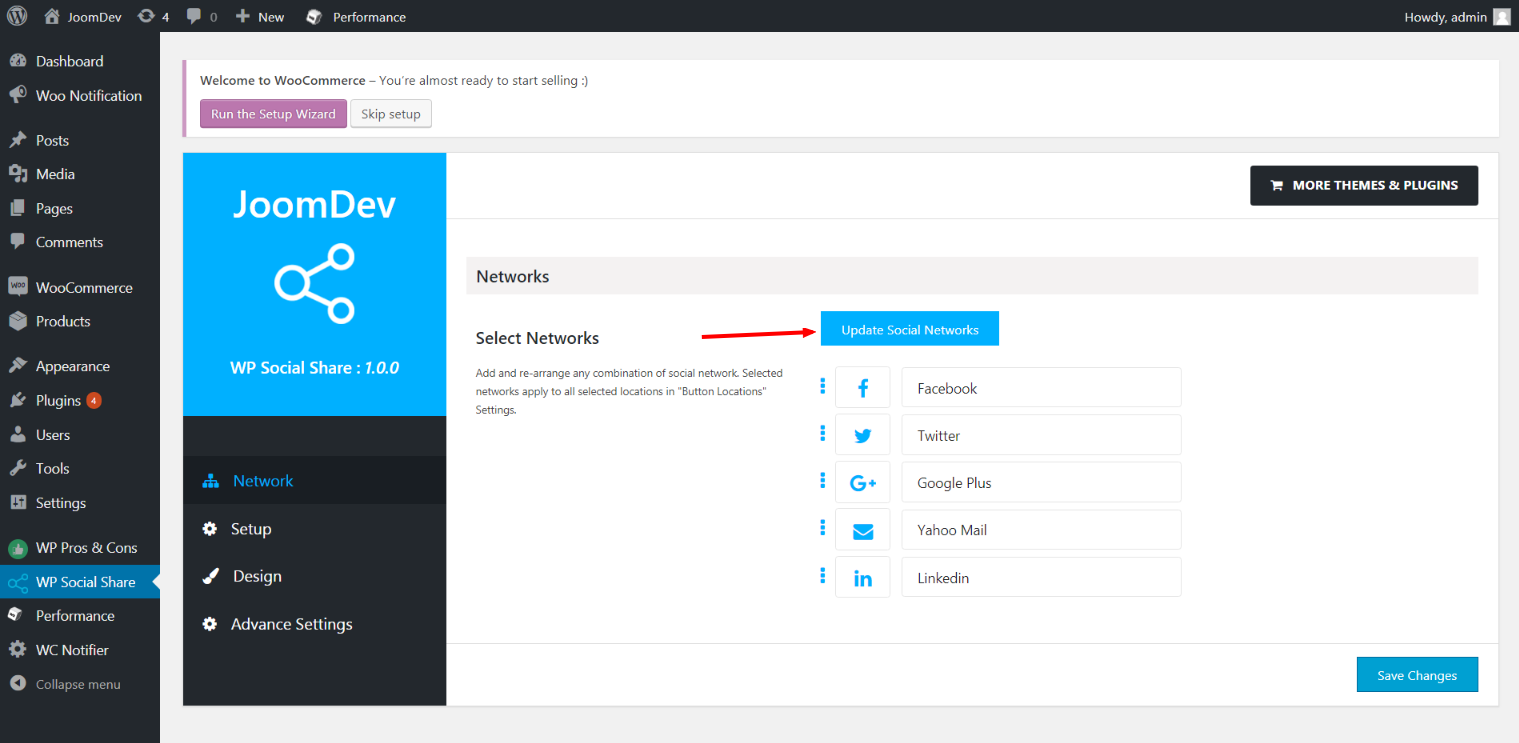
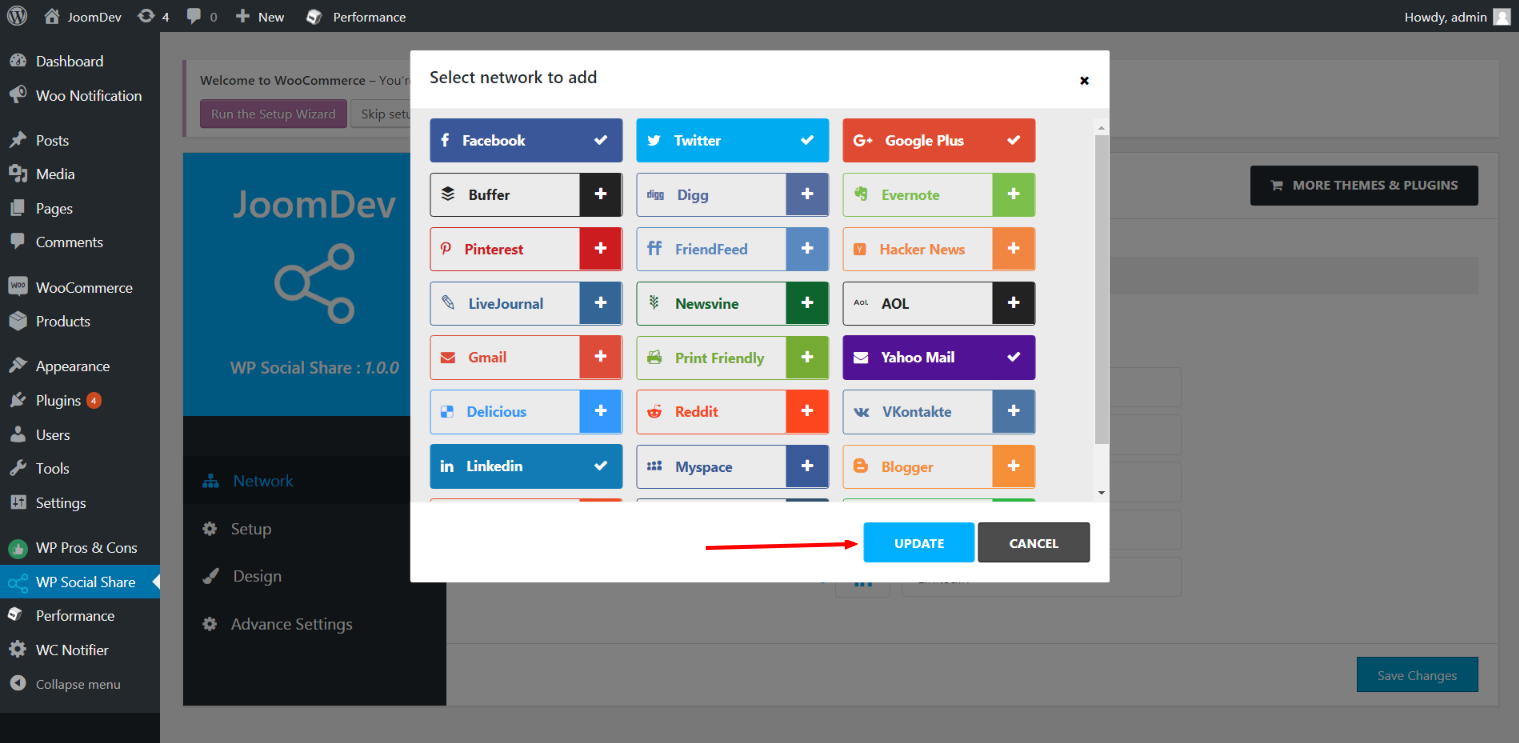
Click here to select networks
Update networks after selecting them.
Setup plugin and api settings.
Select any design to display the buttons.
For mobile
For mobile

Instalacija

Way 1: 1. Upload joomdev-wp-social-share.zip to the /wp-content/plugins/ directory 2. Extract the zip file. 3. Activate the plugin from wordpress plugins page. And you have done.

Way 2: 1. Go to plugins page in admin. 2. Click on Add New button. 3. Search for „WP ShareX“. 4. Click install on WP Social Share. 5. Activate the plugin.

HSP

Installation Instructions

Way 1:
1. Upload joomdev-wp-social-share.zip to the /wp-content/plugins/ directory
2. Extract the zip file.
3. Activate the plugin from wordpress plugins page. And you have done.

Way 2:
1. Go to plugins page in admin.
2. Click on Add New button.
3. Search for „WP ShareX“.
4. Click install on WP Social Share.
5. Activate the plugin.

How do I use this plugin?

See description.

Pohódnoćenja

Excellent!

Arnab Mohapatra 16. měrca 2018 1 reply
Incredible plugin. It allows to add any sharing button on the page simply and fast!
Čitajće 1 pohódnoćenje

Sobuskutkowarjo a wuwiwarjo

„WP ShareX“ je softwara wotewrjeneho žórła. Slědowacy ludźo su k tutomu tykačej přinošowali.

Sobuskutkowarjo
  • joomdev

Přełožće „WP ShareX“ do swojeje rěče.

Na wuwiću zajimowany?

Přehladajće kod, hladajće do SVN-repozitorija abo abonujće wuwiwanski protokol přez RSS.

Protokol změnow

1.0.0

  • New Plugin initialized.

Meta

  • Version 1.0.0
  • Last updated 9 lět
  • Active installations 10+
  • WordPress version 3.0 abo nowši
  • Tested up to 4.9.36
  • Language
    English (US)
  • Tags
    sharesocialsocial share
  • Rozšěrjeny napohlad

Pohódnoćenja

5 out of 5 stars.
  • 1 5-star review 5 stars 1
  • 0 4-star reviews 4 stars 0
  • 0 3-star reviews 3 stars 0
  • 0 2-star reviews 2 stars 0
  • 0 1-star reviews 1 star 0

Your review

See all reviews

Sobuskutkowarjo

  • joomdev

Podpěra

Chceće něšto prajić? Trjebaće pomoc?

Forum pomocy pokazać

Darić

Chceće dalewuwiwanje tutoho tykača podpěrać?

Za tutón tykač darić

  • About
  • News
  • Hosting
  • Privacy
  • Showcase
  • Themes
  • Plugins
  • Patterns
  • Learn
  • Support
  • Developers
  • WordPress.tv ↗
  • Get Involved
  • Events
  • Donate ↗
  • Swag ↗
  • WordPress.com ↗
  • Matt ↗
  • bbPress ↗
  • BuddyPress ↗
WordPress.org

Hornjoserbšćina

The WordPress® trademark is the intellectual property of the WordPress Foundation.

  • Visit our X (formerly Twitter) account
  • Visit our Bluesky account
  • Visit our Mastodon account
  • Visit our Threads account
  • Visit our Facebook page
  • Visit our Instagram account
  • Visit our LinkedIn account
  • Visit our TikTok account
  • Visit our YouTube channel
  • Visit our Tumblr account
Kod je poezija.