

Wopisanje
Sponsarva is a UK marketplace where brands sponsor verified creators, with payment held in escrow until delivery. This plugin closes the loop: it tracks which sales on your WooCommerce store came from the creators you sponsor — verified, refund-adjusted, and automatic.
What it does
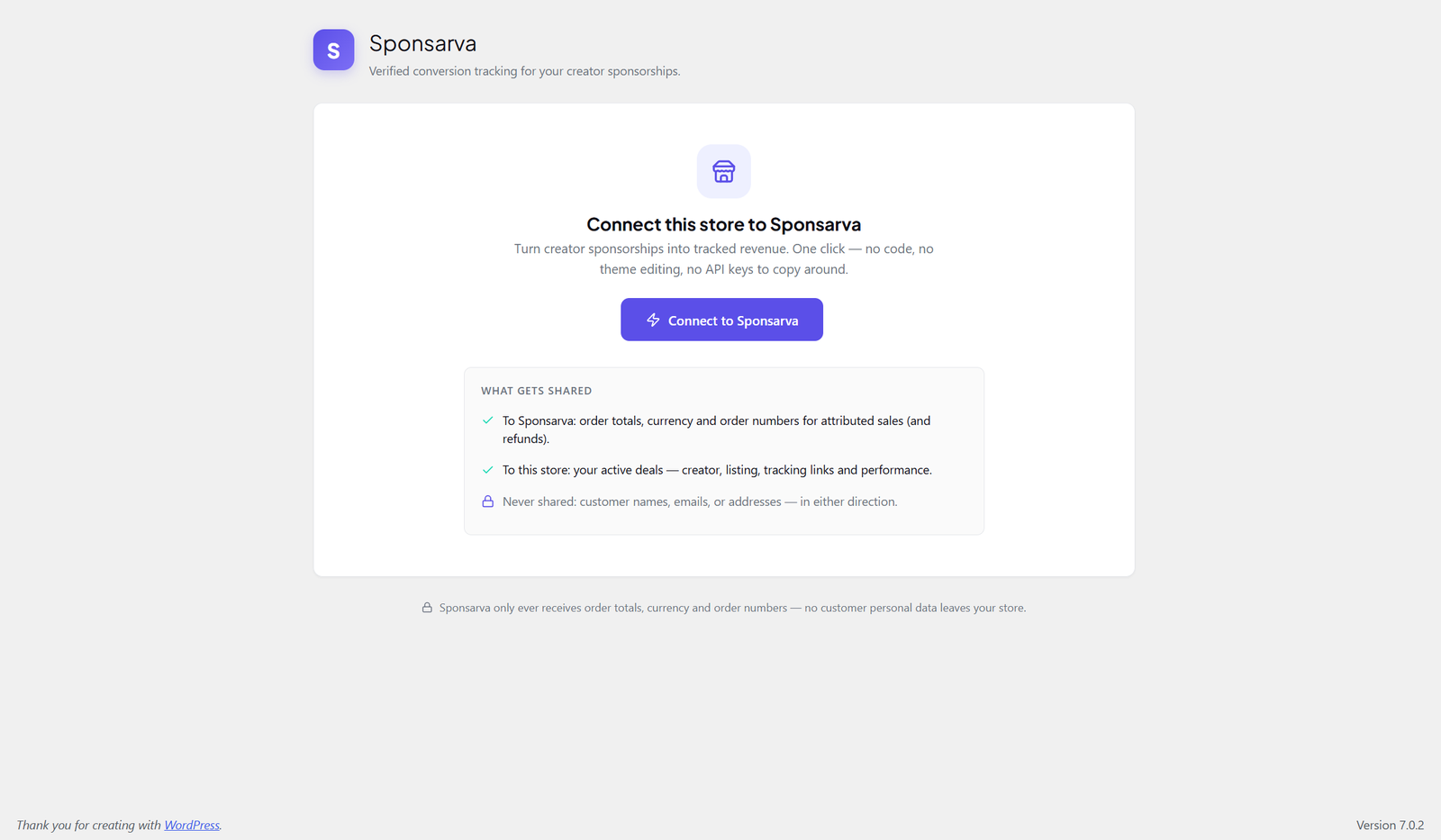
- One-click connection. Click Connect to Sponsarva, approve in your Sponsarva account, done. No API keys, no code, no template editing.
- Automatic attribution. When a shopper arrives through a creator’s Sponsarva tracking link, the plugin remembers the referral for 30 days (first-party cookie on your own domain — no third-party cookies).
- Verified sales reporting. When an attributed customer orders, the plugin reports the order total server-to-server with a cryptographic signature. Your Sponsarva dashboard shows revenue your store actually confirmed — not estimates.
- Refunds handled. Full or partial refunds on attributed orders reverse the reported revenue automatically, so figures stay honest.
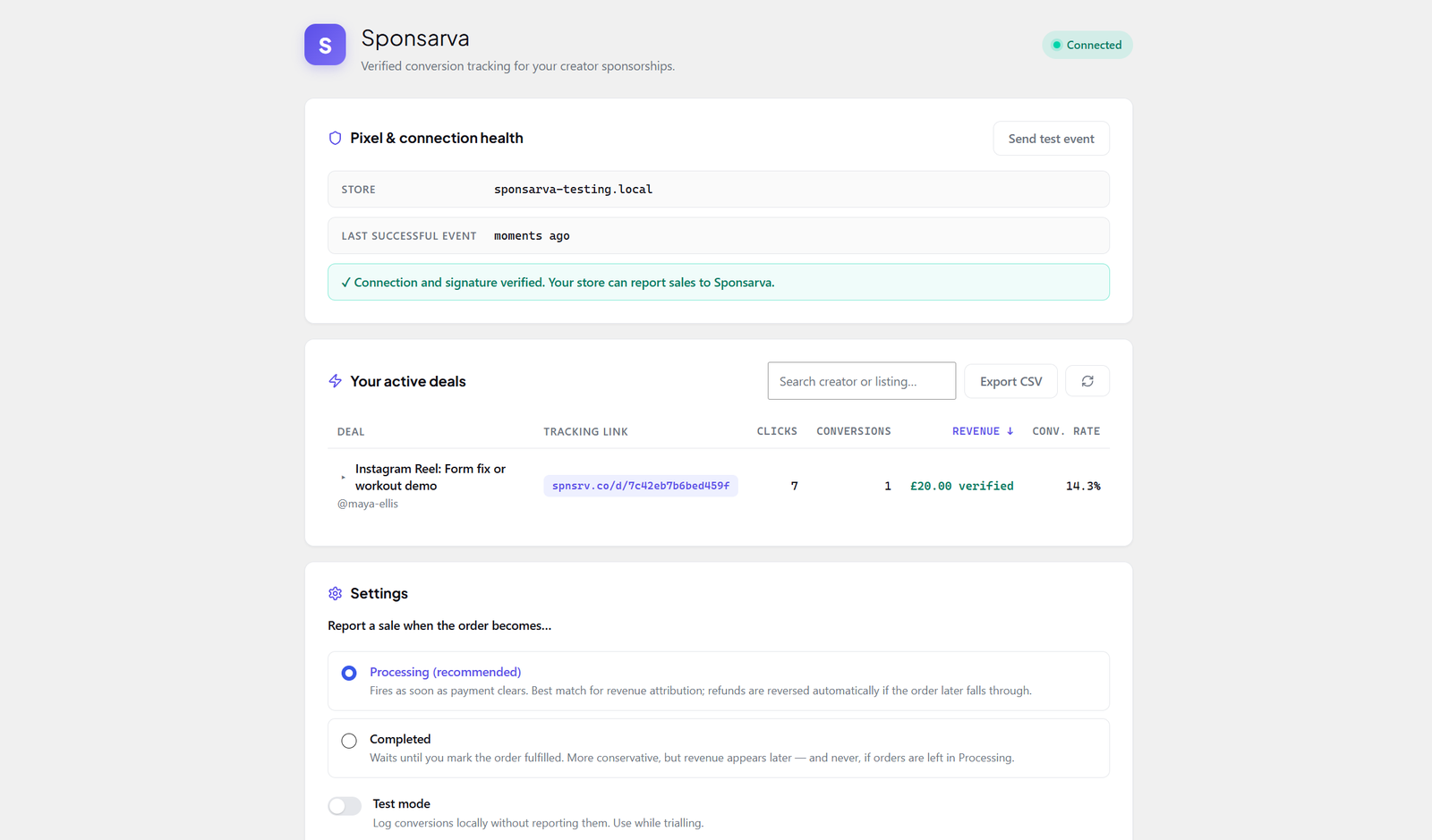
- A deals dashboard in wp-admin. See every active sponsorship — creator, tracking link, clicks, conversions, verified revenue — under WooCommerce Sponsarva. Search, sort, and export to CSV.
- Recent orders & attribution. Your store’s latest orders with the plugin’s decision on each — attributed to a deal (and whether the report went out), or not attributed. Shown from your own WooCommerce data; nothing extra leaves your site.
- Test it in two minutes. A built-in test link lets you place a test order and watch it register as a verified test of the tracking pipeline — no live sponsorship deal required, and test clicks are never reported as sales.
- Never interferes with checkout. Reporting runs in a background queue (Action Scheduler) with retries. If Sponsarva is unreachable, your orders process exactly as normal.
The plugin is free. Sponsarva earns a commission when sponsorship deals complete on the marketplace; this plugin exists so you can see what that spend returned.
You need a Sponsarva brand account (free to create at sponsarva.com) to connect the plugin.
External services
This plugin connects to the Sponsarva API (api.sponsarva.com), operated by Sponsarva. This is required for its core purpose: reporting attributed sales and fetching your sponsorship deals.
Data sent to Sponsarva:
- When you connect: your site URL and the plugin version.
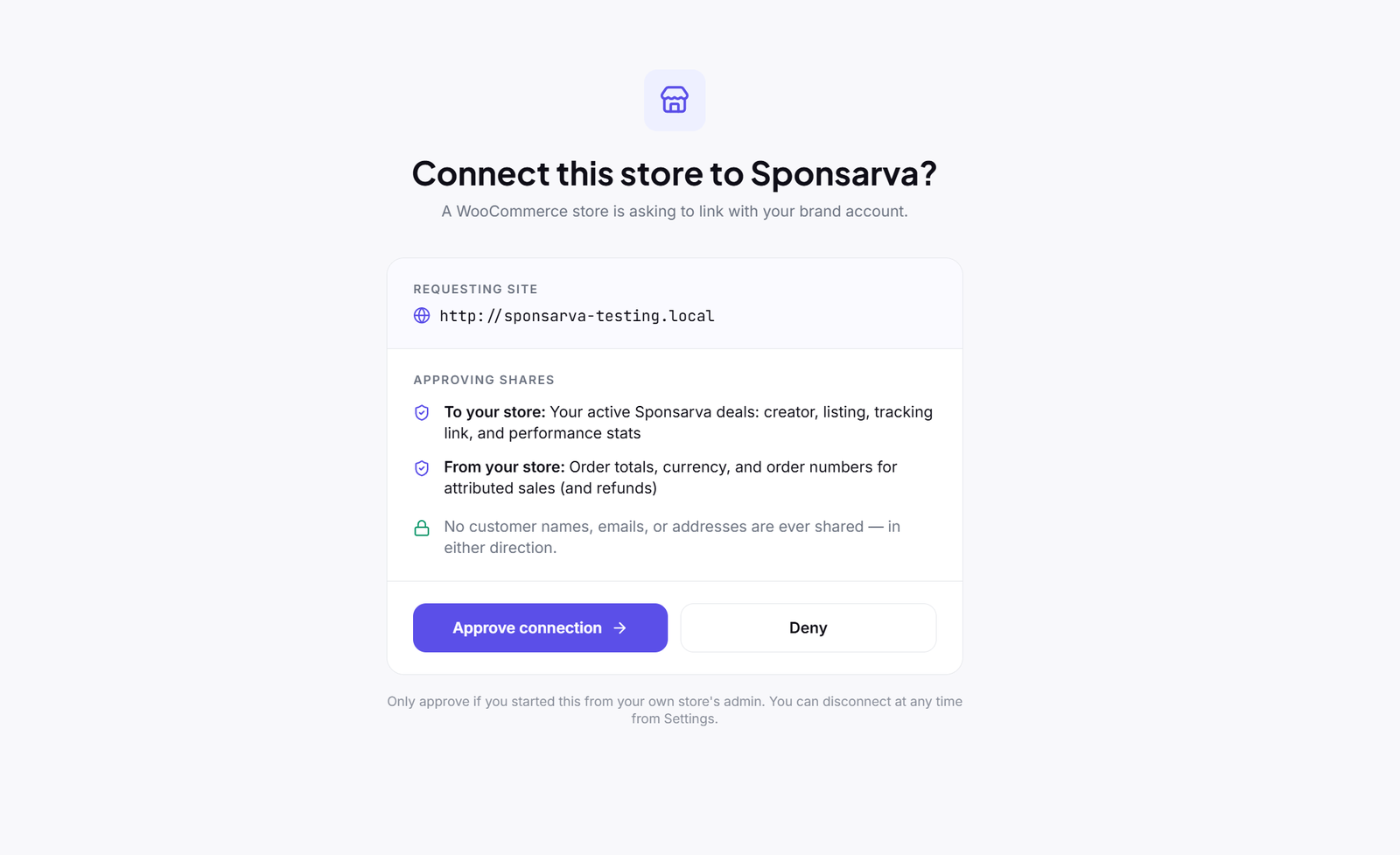
- For attributed sales and refunds only: the order total, currency, and WooCommerce order number.
- Never sent: customer names, email addresses, physical addresses, phone numbers, items purchased, or any other customer data.
Data received from Sponsarva: your active sponsorship deals (creator name, listing title, tracking links, and performance statistics) for display in wp-admin.
All requests are made over HTTPS with certificate verification. See the Sponsarva Terms of Service and Privacy Policy.
The storefront attribution script is served locally from this plugin (no external script is loaded on your storefront).
Fota wobrazowki
Instalacija
- Install and activate the plugin through the WordPress Plugins screen (WooCommerce must be active).
- Go to WooCommerce Sponsarva and click Connect to Sponsarva.
- A Sponsarva tab opens — sign in to your brand account and approve the connection for your store.
- Return to wp-admin. The plugin finishes connecting automatically within a few seconds.
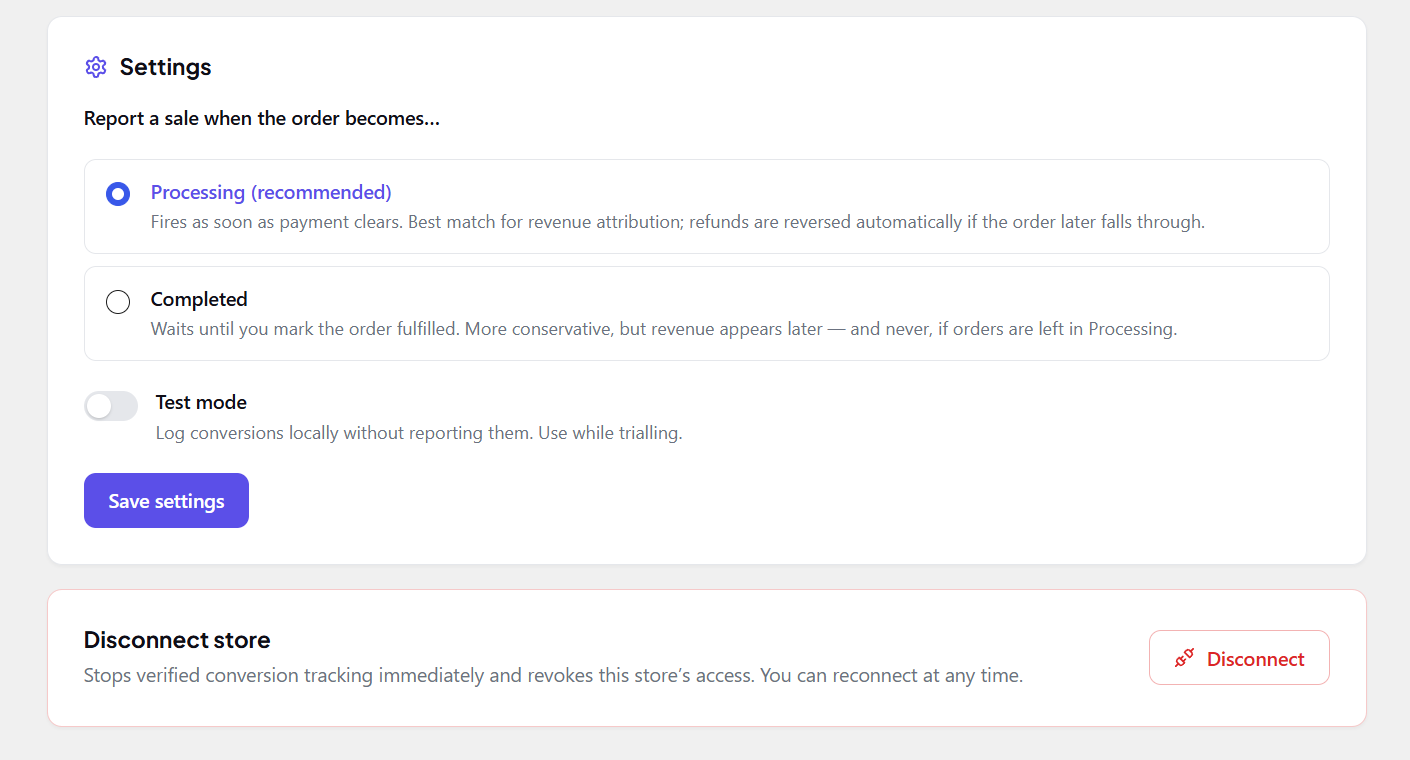
- Optional: use Send test event to confirm the connection, and choose whether sales report at Processing (default) or Completed status.
HSP
-
Does this cost anything?
-
No. The plugin is free with no premium tier. Sponsarva earns commission on marketplace deals, not on tracking.
-
Does it send my customers‘ personal data anywhere?
-
No. Only order totals, currency, and order numbers for attributed sales are sent — never names, emails, addresses, or purchased items. This is stated on the plugin’s admin screen and enforced in code.
-
Will it slow down my store?
-
No. The attribution script is under 4 KB, loads deferred in the footer, and sets a single first-party cookie only for visitors who arrive via a sponsorship link (plus a short-lived first-party marker cookie if you open the plugin’s own test link). Order reporting happens in a background queue after checkout.
-
What happens if Sponsarva is down?
-
Nothing visible to you or your customers. Orders process normally; the report is queued and retried with backoff for up to 24 hours.
-
Can I disconnect?
-
Yes — from the plugin’s settings (Disconnect) or from your Sponsarva dashboard (Settings Connected stores). Either revokes access immediately. Deleting the plugin removes all its options and scheduled tasks.
-
Does it work with HPOS (High-Performance Order Storage)?
-
Yes. The plugin declares HPOS compatibility and uses WooCommerce’s order APIs throughout.
-
Which currencies are supported?
-
GBP, USD, and EUR. Orders in other currencies are skipped (never mis-reported).
Pohódnoćenja
Za tutón tykač pohódnoćenja njejsu.
Sobuskutkowarjo a wuwiwarjo
„Sponsarva — Verified Sponsorship Tracking for WooCommerce“ je softwara wotewrjeneho žórła. Slědowacy ludźo su k tutomu tykačej přinošowali.
Sobuskutkowarjo
Přełožće „Sponsarva — Verified Sponsorship Tracking for WooCommerce“ do swojeje rěče.
Na wuwiću zajimowany?
Přehladajće kod, hladajće do SVN-repozitorija abo abonujće wuwiwanski protokol přez RSS.
Protokol změnow
1.0.3
- New: Recent orders & attribution panel — the store’s latest orders with the plugin’s decision on each (attributed to a deal + report status, test click, or no Sponsarva click found). Reads your own WooCommerce data; no new data is sent anywhere.
- New: Test attribution link — place a test order and see the tracking pipeline verified end-to-end without needing a live deal. Test clicks set a 24-hour first-party marker cookie and are never reported as sales.
1.0.2
- Fix: attributed orders placed through the block (Store API) checkout are now reported reliably — conversion capture reads the in-memory order at status change instead of racing meta persistence.
- Orders now receive an order note when a conversion is reported to Sponsarva.
1.0.1
- Fix: attribution now recognises the utm_campaign=deal_ parameter format used by Sponsarva tracking links (in addition to the legacy format).
1.0.0
- Initial release: one-click store pairing, automatic attribution (30-day first-party cookie), signed server-to-server conversion reporting, automatic refund reversal, Action Scheduler retry queue, deals dashboard with search/sort/CSV export.