
Wopisanje
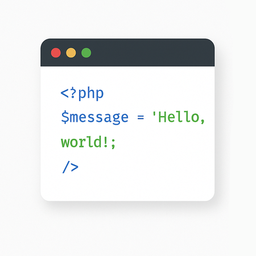
The „Light Code Block“ plugin is a simple and lightweight solution for inserting and displaying code snippets in posts and pages.
It works by adding a custom „LC“ button to the TinyMCE (Classic) editor or a code block in the Gutenberg editor.
The inserted code will be shown on the front end in a clean, readable format.
Usage
- Install and activate the plugin.
- Go to the post or page edit screen.
- In the TinyMCE (Classic) editor, click the „LC“ button in the toolbar.
- In the popup window that opens, paste or write your code, and click OK.
- Save or update your post.
The code will be saved inside a special block and displayed on the front end within a <pre> tag with the class mce-simple-code-block (i.e., <pre class="mce-simple-code-block">...</pre>).
To insert code using the Gutenberg editor, you first need to add a Classic (TinyMCE) block, and then use it to insert your code.
Fota wobrazowki


Instalacija
- Install the „Light Code Block“ plugin through the standard WordPress plugin installer.
- Or unzip and upload the „light-code-block“ folder to the
/wp-content/plugins/directory. - Activate the plugin through the ‚Plugins‘ menu in WordPress.
Pohódnoćenja
Za tutón tykač pohódnoćenja njejsu.
Sobuskutkowarjo a wuwiwarjo
„Light Code Block“ je softwara wotewrjeneho žórła. Slědowacy ludźo su k tutomu tykačej přinošowali.
Sobuskutkowarjo
„Light Code Block“ je so do 1 rěče přełožił. Dźakujemy so přełožowarjam za jich přinoški.
Přełožće „Light Code Block“ do swojeje rěče.
Na wuwiću zajimowany?
Přehladajće kod, hladajće do SVN-repozitorija abo abonujće wuwiwanski protokol přez RSS.
Protokol změnow
1.0.2
- Tested up to WordPress 6.9
1.0.1
- For backward compatibility, the class „mce-simple-block-code“ has been added.
1.0.0
- Init release.