

Wopisanje
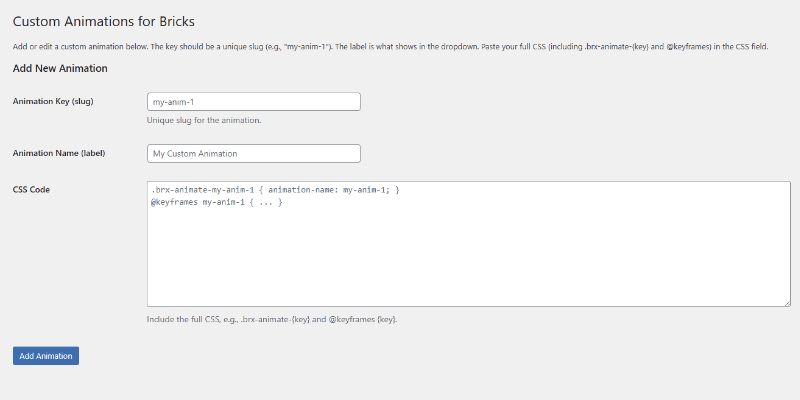
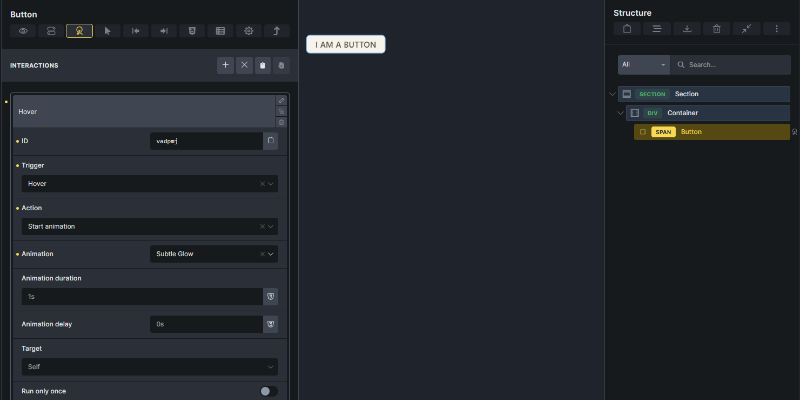
Custom Animations for Bricks is a lightweight plugin that lets you easily add custom CSS animations to your Bricks Builder sites. Through a simple admin interface, you can define animation keys, labels, and full CSS code (including @keyframes and .brx-animate- classes). These animations then appear in the Bricks Interactions panel’s „Start animation“ dropdown, allowing seamless integration with triggers like viewport entry or mouse hover.
Key Features:
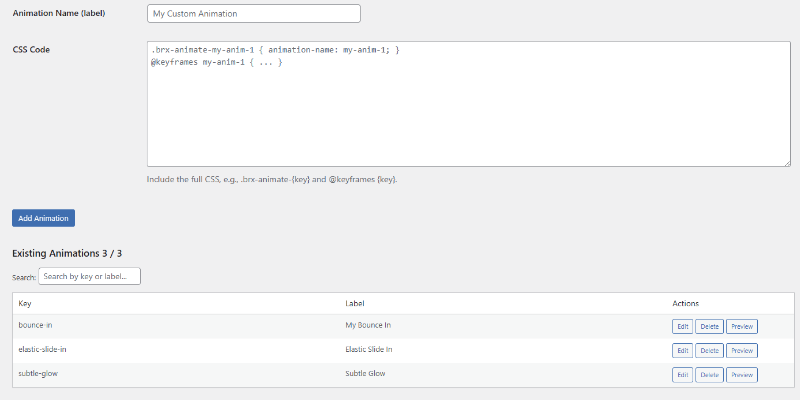
* User-friendly form to add/edit/delete animations with validation for Bricks compatibility.
* Live search and sort in the animations table for quick management.
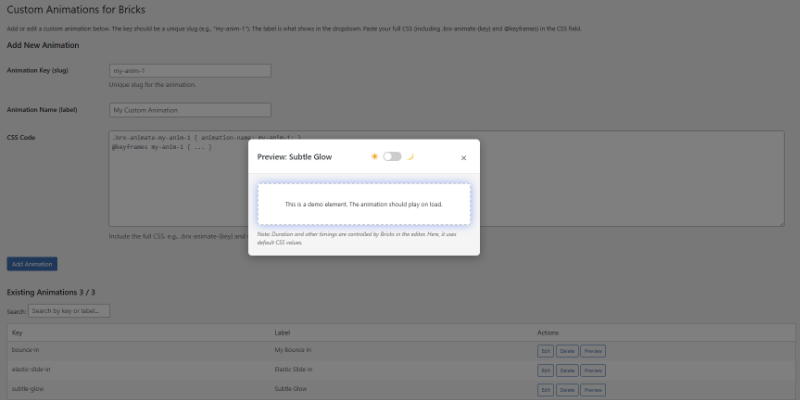
* Preview modal with dark/light mode toggle to test animations right in the admin (replays on mode switch).
* Enqueues CSS only on frontend (skips Bricks editor for performance).
* Stores animations securely in WordPress options—no database tables needed.
This plugin requires the Bricks theme to be active and has been tested with Bricks Builder version 2.3.5.
Fota wobrazowki
Instalacija
- Download the plugin ZIP from the WordPress repository.
- In your WordPress admin, go to Plugins > Add New > Upload Plugin and select the ZIP.
- Activate the plugin.
- Ensure the Bricks theme is installed and active (tested with version 2.3.5).
- Navigate to Bricks > Custom Animations in the admin menu to start adding animations.
HSP
-
Does this plugin require Bricks Builder?
-
Yes, it integrates directly with Bricks‘ animation system and requires the Bricks theme to be active. It has been tested with Bricks Builder version 2.3.5.
-
How do I add a custom animation?
-
- Go to Bricks > Custom Animations.
- Fill in the key (slug, e.g., „my-glow“), label (display name), and CSS (full block with .brx-animate-{key} and @keyframes).
- Click Add Animation.
- In the Bricks editor, select an element > Interactions > Start animation > Choose your new option.
-
Why isn’t my animation showing in the preview?
-
Ensure your CSS includes an
animation-duration(e.g., 2s) for the preview fallback—Bricks overrides this in the editor. Test with the modal’s dark/light toggle for contrast. -
Is it performant?
-
Yes—minimal overhead (<50ms load, 1-2 queries). CSS enqueues only on frontend; no global assets.
-
Can I export/import animations?
-
Not yet—future updates may add this. For now, back up via Tools > Export > All content (options included).
Pohódnoćenja
Za tutón tykač pohódnoćenja njejsu.
Sobuskutkowarjo a wuwiwarjo
„Custom Animations for Bricks“ je softwara wotewrjeneho žórła. Slědowacy ludźo su k tutomu tykačej přinošowali.
Sobuskutkowarjo
Přełožće „Custom Animations for Bricks“ do swojeje rěče.
Na wuwiću zajimowany?
Přehladajće kod, hladajće do SVN-repozitorija abo abonujće wuwiwanski protokol přez RSS.
Protokol změnow
1.2.0
- Fixed CSS output hook from wp_head to wp_enqueue_scripts to ensure animation styles load correctly.
- Removed non-functional bricks_template option block that was never populated by Bricks.
- Cleaned up meta key list — removed _bricks_page_content_3 which is not a valid Bricks meta key.
- Replaced hardcoded version strings in enqueue calls with CUSTANIMFORBX_VERSION constant.
- Bumped Requires at least to WordPress 6.0.
- Tested and confirmed compatible with WordPress 7.0 and Bricks Builder 2.3.5.
1.1.15
- Class name updated from CustomAnimationsBricks to CUSTANIMFORBX_CustomAnimationsBricks.
1.1.14
- Prefix Update, CSS Enqueue, Inline CSS in Preview
1.1.13
- Only loads animation CSS on pages where animations are used, boosting performance.
- Fixed code standard issues for better compatibility and security.
- Improved animation detection for Bricks Builder pages and templates.
- Added secure debugging for developers (requires WP_DEBUG).
1.1.12
- Added ABSPATH guard to prevent direct access.
- Define plugin constants to reference paths/URLs safely.
1.1.11
- Fixed minor JS issue in preview modal for smoother animation replay.
1.1.10
- Improved nonce validation for edit/delete actions.
1.1.9
- Aggressively hide checkbox in toggle for full invisibility.
1.1.8
- Simplified plugin name to „Custom Animations for Bricks“.
- Ensured icon colors swap reliably on mode change.
1.1.7
- Fixed icon alignment in toggle (sun left, moon right, no overlap).
- Dynamic color transitions for icons (yellow active, gray inactive).
1.1.6
- Added icons to toggle with fade effects.
- Prevented modal close on toggle click.
1.1.5
- Replay animation on dark/light toggle.
- Modern CSS toggle switch (no icons initially).
1.1.4
- Toggle switches modal body background only (demo box stays light).
- Fixed toggle closing modal.
1.1.3
- Added dark/light mode toggle to preview modal (starts light).
1.1.2
- Darker demo background in preview for better glow contrast.
1.1.1
- Added Preview button with modal demo and CSS injection.
1.1.0
- Fixed search hiding form elements.
1.0.9
- Live dynamic search with count updates and clear button.
1.0.8
- Overhauled search to client-side filtering.
1.0.7
- Fixed form key field naming bug.
1.0.6
- Added edit functionality, search/sort, and CSS validation.
1.0.5
- Menu under Bricks with unique slug.
1.0.4
- Nested under Bricks > Settings.
1.0.3
- Standalone menu to avoid redirects.
1.0.2
- Admin menu priority fix.
1.0.1
- Fixed Bricks theme check and CSS output.
1.0.0
- Initial release.