Wopisanje
Adds a basic front-end login for to any page, post or widget and redirects to the page you choose. It also can block access to the back-end and disable the Admin Bar. This plugin is for when you want your users to be logged-in, but do not want them to have access to the WordPress Dashboard.
To display the login form, place this shortcode on any page, post, or widget: [eeBFEL]
After the user has logged in, they will be redirected to your home page or the URL you define in the plugin settings. You can also optionaly display a logout button at the bottom-right of each page.
Redirect After Login
To define destinations in additional login forms, use the „redirect“ attribute to over-ride the default. There is no limit to the number of forms you can use.
[eeBFEL redirect=“https://website.com/your-files-page/“]
Deny Dashboard Access
In the plugin settings you can optionally select roles that you want to deny back-end access to. All built-in and custom roles, except Administrator, can be blocked. The Admin Bar will not appear and direct back-end access attempts will simply redirect to your home page. This restriction will be site-wide and is unrelated to the use of the shortcode.
Even if you don’t need a login form, this can add an extra measure of security to your website by denying back-end access to all roles except Administrators.
NEW – Show a Logout Button
Optionally show a small logout button on the bottom-right of each page if the user is logged in. Logging out returns the user to the home page.
Fota wobrazowki

Basic Login Form 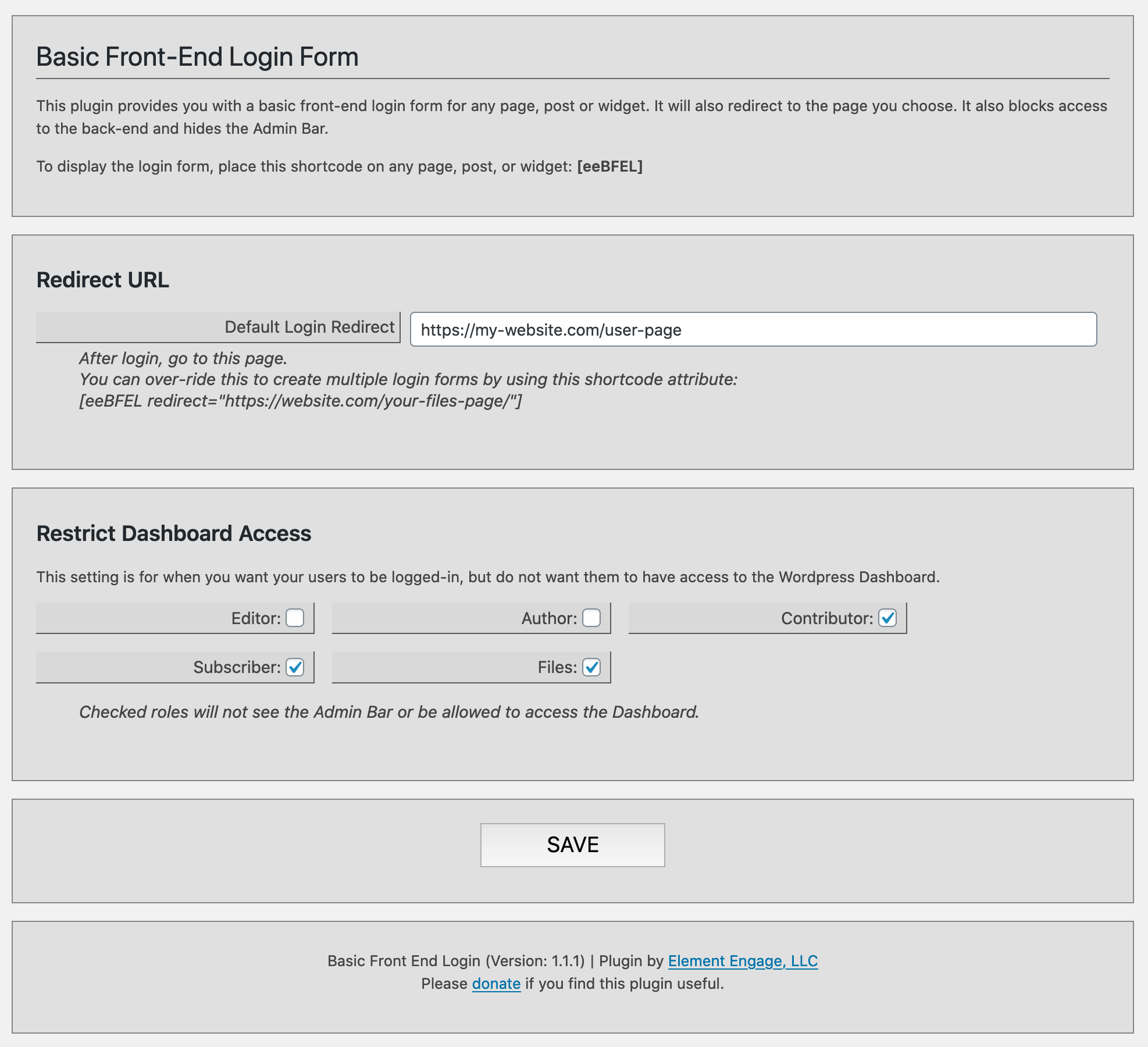
Plugin Settings
Instalacija
Just like most other WordPress plugins…
- To install, simply use the amazing WordPress plugin installer, or upload the plugin zip file to your WordPress website, and activate it.
- A new main menu item will appear: Settings > Login Form Click on this.
- Configure the redirect URL and check the roles you wish to deny back-end access.
- To add the login form to your website, simply add this shortcode:
[eeBFEL redirect=“https://website.com/your-files-page/“]
HSP
-
What is this plugin for?
-
I wrote this plugin because I needed a front-end login form, but didn’t want the users to have any access to the back-end.
-
Can’t the users just type in the dashboard address to reach it?
-
No. Any user with the chosen roles will be prevented from viewing the WordPress Dashboard.
-
How do users log out?
-
If users return to the login page, a „Log Out“ link will appear. You can also add a Log Out link on your page like this…
<a href="https://your-website.com/wp-login.php?action=logout">Log Out</a>
Pohódnoćenja


Sobuskutkowarjo a wuwiwarjo
„Basic Front-End Login“ je softwara wotewrjeneho žórła. Slědowacy ludźo su k tutomu tykačej přinošowali.
Sobuskutkowarjo
Přełožće „Basic Front-End Login“ do swojeje rěče.
Na wuwiću zajimowany?
Přehladajće kod, hladajće do SVN-repozitorija abo abonujće wuwiwanski protokol přez RSS.
Protokol změnow
1.3.1
- Added global logout button option
- Admin UI improvements
- Improved file structure and many code improvements
- Accessability and security Improvements
- Updated translations
1.2.1
- Added Copy-to-Clipboard function for the shortcode string
- Added Check All / Uncheck All to the Restriction options
- Updated security
- Updated code base
- Renamed back to Basic Front-End Login
1.1.4
- Renamed the Plugin from Basic Front-End Login to Simple Front-End Login
1.1.3
- Moved the menu item into the Users menu
- Completed translations
1.1.1
- Initial Public Release
1.0.2
- Expanded for public distribution.
1.0.1
- Basic build for Simple File List, File Access Manager demo login.