
Wopisanje
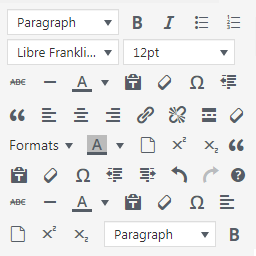
WordPress Manage TinyMCE Editor allows you to add buttons to WordPress TinyMCE editor.
Using the plugin you will be able to add the following buttons to the default WordPress visual editor:
Cut
Copy
Paste
Source code
Font family selector
Font size selector
Style selector
Background color
Empty document
Superscript
Subscript
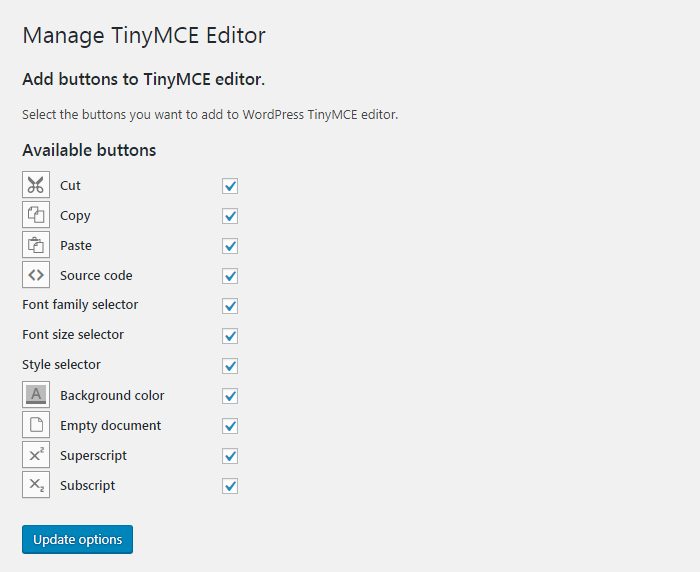
Select the desired buttons in the plugin’s settings page and they will be available in TinyMCE.
Fota wobrazowki

Instalacija
Automatic installation
- Go to Plugins > Add New > Upload and select the .zip file from your hard disk
- Click the „Install now“ button
- Activate the plugin through the ‚Plugins‘ menu in WordPress
Manual installation
- Upload the plugin folder to the
/wp-content/plugins/directory via ftp - Activate the plugin through the ‚Plugins‘ menu in WordPress
HSP
- Installation Instructions
-
Automatic installation
- Go to Plugins > Add New > Upload and select the .zip file from your hard disk
- Click the „Install now“ button
- Activate the plugin through the ‚Plugins‘ menu in WordPress
Manual installation
- Upload the plugin folder to the
/wp-content/plugins/directory via ftp - Activate the plugin through the ‚Plugins‘ menu in WordPress
- How do I add buttons to WordPress TinyMCE visual editor?
-
Once the plugin is installed and activated, from your dashboard navigate to „Settings > Manage TinyMCE Editor“, check the buttons you want to add and save.
Pohódnoćenja

Sobuskutkowarjo a wuwiwarjo
„Manage TinyMCE Editor“ je softwara wotewrjeneho žórła. Slědowacy ludźo su k tutomu tykačej přinošowali.
Sobuskutkowarjo
Přełožće „Manage TinyMCE Editor“ do swojeje rěče.
Na wuwiću zajimowany?
Přehladajće kod, hladajće do SVN-repozitorija abo abonujće wuwiwanski protokol přez RSS.
Protokol změnow
1.0.0
- First release