

Wopisanje
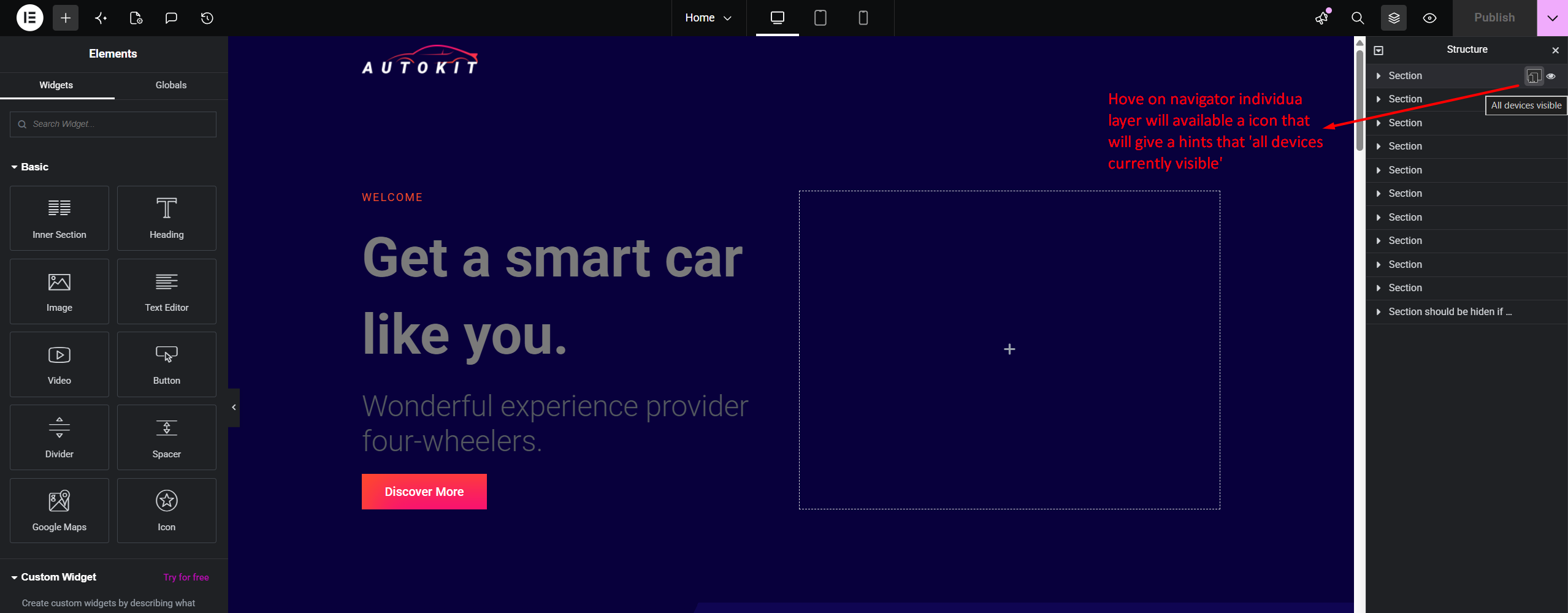
RespSync Visibility Toggle adds a fast, intuitive device visibility toggle button directly inside the Elementor Structure (Navigator) panel item rows.
With a single click, users can check and toggle element visibility across Desktop, Tablet, and Mobile devices without navigating through multiple tab controls in the Elementor settings panel.
Key Features
- Navigator Panel Integration: Instant access directly on Navigator tree items.
- Dynamic Multi-Device Status: Visual device icon indicator showing active and hidden states.
- Floating Tooltip Popup Controls: Compact floating popup with dedicated toggle controls for Mobile, Tablet, Desktop, and All devices.
- Linear Gradient Title Masking: Elegant linear-gradient fade effect on long layer titles when tooltip popup is active.
- Native Synchronization: Seamlessly updates Elementor settings model and marks document as modified for saving.
- Lightweight & Fast: Pure JavaScript integration with zero overhead on front-end performance.
Fota wobrazowki


Instalacija
- Upload the
respsync-visibility-toggle-for-elementordirectory to the/wp-content/plugins/directory. - Activate the plugin through the ‚Plugins‘ menu in WordPress.
- Open any page in the Elementor Editor and view the Structure (Navigator) panel.
HSP
-
Does this plugin affect site loading speed?
-
No. The plugin only loads within the Elementor Editor environment and adds zero JavaScript or CSS assets to your public front-end site.
-
Does it require Elementor Pro?
-
No, it works seamlessly with both Elementor Free and Elementor Pro.
Pohódnoćenja

Sobuskutkowarjo a wuwiwarjo
„RespSync Visibility Toggle for Elementor“ je softwara wotewrjeneho žórła. Slědowacy ludźo su k tutomu tykačej přinošowali.
Sobuskutkowarjo
Přełožće „RespSync Visibility Toggle for Elementor“ do swojeje rěče.
Na wuwiću zajimowany?
Přehladajće kod, hladajće do SVN-repozitorija abo abonujće wuwiwanski protokol přez RSS.
Protokol změnow
1.1.0
- Feature: Replaced slide-down panel with a sleek floating tooltip popup positioned next to the RespSync icon.
- Feature: Added dedicated device toggle controls (Mobile, Tablet, Desktop, All devices) inside the floating tooltip.
- Feature: Added smooth linear-gradient text masking on the Navigator item title so long layer titles appear to pass beneath the floating tooltip.
- Improvement: 4th button („All Devices“) maintains a static clean icon and triggers red background strictly when all 3 individual devices are hidden.
- Fix: Prevented Elementor layer item selection when clicking device icons inside the tooltip popup.
1.0.0
- Initial public release.