Wopisanje
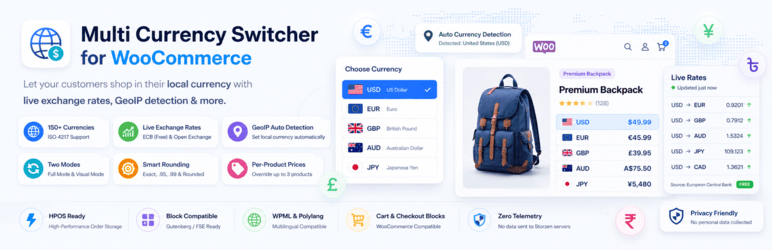
Multi Currency Switcher for WooCommerce lets your store display and process prices in multiple currencies — fast, clean, and conversion-focused.
Core Features
- 150+ currencies with flag emoji, symbol, and name display
- Auto exchange rates via European Central Bank (free) or Open Exchange Rates
- GeoIP auto-detect using WooCommerce MaxMind first, free API fallback
- Full mode — prices, cart, shipping, and checkout in selected currency
- Visual mode — display in any currency, charge in base currency
- Per-product fixed prices — regular and sale price per currency (simple + variable)
- Per-variation prices — set regular and sale price per currency at variation level
- Smart rounding — Exact, Round, Charm (.95), and .99 Pricing presets
- Gutenberg block — drag into any page, post, or FSE template (v1.1.3)
- REST API — POST /switch and GET /currencies endpoints (v1.1.3)
- Shortcode — [storzen_currency_switcher]
- Classic widget — sidebar and footer areas
- 3 switcher styles — Dropdown, Button group, Native select
- Full keyboard navigation — ARIA listbox, arrow keys, Escape focus management
- Zero jQuery on the frontend (v1.1.3)
- HPOS compatible — High-Performance Order Storage declared
- Blocks compatible — Cart and Checkout blocks declared
REST API (v1.1.3)
Switch currency:
POST /wp-json/storzen-cs/v1/switch
Headers: Content-Type: application/json, X-WP-Nonce:
Body: { „currency“: „EUR“ }
Returns: { currency, symbol, label, rate }
List currencies:
GET /wp-json/storzen-cs/v1/currencies
Returns: { currencies[], base, current }
Privacy & GDPR
This plugin makes requests to the following third-party services:
GeoIP detection (only when GeoIP is enabled in settings):
* Service: api.country.is
* Purpose: Detects visitor’s country from their IP address to auto-select currency
* Data sent: Visitor IP address
* Privacy policy: https://country.is/
Exchange rate data (only when ExchangeRate-API or ECB supplement is selected):
* Service: open.er-api.com (ExchangeRate-API)
* Purpose: Fetches live currency exchange rates
* Data sent: No personal data — request is for rate data only
* Privacy policy: https://www.exchangerate-api.com/privacy
No personal data is stored or transmitted to plugin author servers.
The visitor IP sent to api.country.is is used only to return a country code and is not stored by the plugin.
Cookie: SameSite=Lax, Secure on HTTPS, HttpOnly.
Zero analytics, zero telemetry, zero third-party tracking SDKs.
Compatibility
- WooCommerce 8.0+, WordPress 6.5+, PHP 8.1+
- HPOS, WooCommerce Blocks, Block themes (FSE), Classic themes
- WPML, Polylang, Elementor, Divi, Bricks, Kadence, Astra
Fota wobrazowki


Bloki
Tutón tykač 1 blok skići.
- Currency Switcher Display a currency switcher anywhere in your block theme or content.
Instalacija
- Upload the plugin folder to /wp-content/plugins/ or install from Plugins Add New
- Activate the plugin
- Go to Currency Switcher in the left-hand menu
- On the General tab — select your mode (Full or Visual) and enable currencies
- On the Exchange Rates tab — choose ECB (free, no key) or Open Exchange Rates
- Add the switcher via block, shortcode [storzen_currency_switcher], or widget
- Done ✓
HSP
-
Does this work with WooCommerce Cart & Checkout Blocks?
-
Yes. The plugin declares full compatibility with WooCommerce Cart and Checkout Blocks.
-
Is there a Gutenberg block?
-
Yes — added in v1.1.3. Search „Currency Switcher“ in the block inserter, or find it under WooCommerce.
-
Does GeoIP detection slow down my site?
-
No. WooCommerce’s built-in geolocation (MaxMind) is used when available. On the visitor’s first request the country is detected and stored in a 30-day cookie — no API calls on subsequent page loads.
-
Can I set a different sale price per currency?
-
Yes — added in v1.1.3. On any product edit page, go to Currency Prices tab and enter a regular price and/or sale price for each enabled currency. Works for simple products and individual variations.
-
Does it support variable products?
-
Yes. Per-currency regular and sale prices are available at the variation level directly inside the variation panel.
-
No. Zero customer or store data is ever sent to our servers.
Pohódnoćenja
Za tutón tykač pohódnoćenja njejsu.
Sobuskutkowarjo a wuwiwarjo
„Multi Currency Switcher for WooCommerce“ je softwara wotewrjeneho žórła. Slědowacy ludźo su k tutomu tykačej přinošowali.
Sobuskutkowarjo

Přełožće „Multi Currency Switcher for WooCommerce“ do swojeje rěče.
Na wuwiću zajimowany?
Přehladajće kod, hladajće do SVN-repozitorija abo abonujće wuwiwanski protokol přez RSS.
Protokol změnow
1.1.3
- New: Gutenberg block (
storzen-cs/switcher) for block editor and Full Site Editor. - New: REST API — POST /wp-json/storzen-cs/v1/switch and GET /wp-json/storzen-cs/v1/currencies.
- New: Per-currency sale price override on simple products.
- New: Per-variation regular and sale price per currency.
- Improved: GeoIP now tries WooCommerce built-in geolocation (MaxMind) first before external API.
- Improved: Frontend JS rewritten in vanilla JavaScript — jQuery dependency removed.
- Improved: load_plugin_textdomain() called explicitly for non-WP.org environments.
- Improved: Requires at least bumped to WordPress 6.5, Requires PHP to 8.1, WC to 8.0. Tested up to WordPress 6.8 and WooCommerce 11.0.
- Fixed: uninstall.php now cleans up storzen_cs_refresh_lock transient, all storzen_cs_price* and storzen_cs_sale_price* post meta, and user-meta dismissal flags.
- Fixed: Tested up to tag corrected to a valid WordPress release.
1.1.0
- New: Developer filter hooks on every price-conversion, switcher-render, and GeoIP-detection path.
- Fixed: Plugin URI typo in main file header.
1.0.0
- Initial release.