

Wopisanje
Elementary POS is a modern cloud-based point-of-sale system for retail businesses. This plugin enables automatic, real-time synchronization of products and inventory between your Elementary POS system and WooCommerce store.
Key Features
- HPOS Compatible – Fully compatible with WooCommerce High-Performance Order Storage
- Bidirectional Product Import – Import products from Elementary POS to WooCommerce, or export from WooCommerce to Elementary POS
- Tax Mapping System – Intelligent tax mapping between WooCommerce tax classes and Elementary POS tax types
- Draft Mode Import – Option to import new products as Draft instead of Published
- Draft Products Synchronization – Optional synchronization of draft products along with published ones
- Safe Product Removal – Products are moved to Trash instead of permanent deletion, allowing recovery
- Bidirectional Stock Sync – Keep stock levels synchronized in both directions
- Real-time Webhooks – Instant updates when sales occur in Elementary POS
- Automatic Order Sync – WooCommerce orders automatically update Elementary POS inventory
- Queue System – Reliable processing with automatic retry on failures; failed items are automatically retried when new activity occurs
- Comprehensive Logging – Track all synchronization activities with detailed logs
- Manual Controls – Full manual control over synchronization when needed
How It Works
What Gets Synchronized:
Elementary POS WooCommerce:
* Product data (name, SKU, price, categories, tax classes)
* Stock quantity changes from all sources (sales, manual adjustments, inventory corrections)
WooCommerce Elementary POS:
* Product data (name, SKU, price, tax classes)
* Stock quantity changes from orders, at the moment WooCommerce reduces or restores stock for them
* Manual stock adjustments in WooCommerce admin
When Synchronization Happens:
Elementary POS WooCommerce:
When any stock change occurs in Elementary POS (sale, manual adjustment, etc.), a webhook is sent to WooCommerce.
The plugin processes the update immediately in real-time, updating stock levels in WooCommerce.
WooCommerce Elementary POS:
When WooCommerce reduces stock for an order – which happens on payment and when the order moves to Processing, On hold or Completed – or when stock is changed by hand in the WooCommerce admin, the change is sent to Elementary POS automatically.
Changes are sent immediately when they occur. If the till cannot be reached, the change is queued and tried again after fifteen minutes and then after an hour. A change that failed within the last twenty-four hours is picked up again whenever new stock activity occurs, so a till that was briefly out of reach costs nothing. Older than that it is left alone – a difference a day old is better repaired by a manual synchronization than applied blind – and after thirty days it is removed. A change Elementary POS refuses outright – it has no item with that SKU, or the unit means nothing to it – is recorded in the log and not retried, because the answer would be the same every time.
Requirements
- WordPress 5.8 or higher
- WooCommerce 9.1 or higher – the hooks that announce the stock changes an order makes arrived in WooCommerce 7.6 and 9.1. On anything older, stock put back by a cancelled order never reaches the till, and the correction against the till then quietly puts the sold goods back on the shelf
- PHP 7.4 or higher
- Elementary POS API key
- Products must have SKU codes for stock synchronization (product import can work without SKU)
Compatibility
- HPOS Compatible – Fully compatible with WooCommerce High-Performance Order Storage
- WP Cron – Uses WordPress cron for queue processing (runs every 15 minutes)
Limitations
- Decimal Quantities Not Supported – WooCommerce counts stock in whole numbers and cuts a decimal change down rather than rounding it, so a change of half a unit becomes no change at all and 1.5 becomes 1. For items sold by the piece the shop catches up anyway, because the plugin also compares against the quantity the till reports and writes that whole number in; the difference never grows past one item. For an item whose unit in Elementary POS is anything but pieces that correction is deliberately not made – there is no way to turn 2.5 kg into a number of packets, and writing 2 in would wipe the shop’s own count – so there the fraction is lost for good. In the other direction such an item is refused by the till outright and the change is written to the log instead of being retried. A shop selling by weight, length or volume therefore does not synchronize towards Elementary POS at all, and only whole units reach it from the other side.
- Stock Synchronization Trigger – WooCommerce Elementary POS stock synchronization happens when WooCommerce lowers stock for an order, when it puts stock back for a cancelled order or a refund made with „Restock refunded items“, when an item on an existing order is changed or removed, and when stock is changed by hand in the WooCommerce admin. Anything that changes a quantity in the database without going through one of those – some third-party plugins do – is not seen and does not reach the till. If your store has stock management disabled for certain products (e.g., services, digital products), those products will not trigger synchronization to Elementary POS.
- Product Visibility and Stock Status – Newly imported products are set as „Visible“ in catalog, and catalog visibility is preserved on later imports. For a product that tracks stock, WooCommerce derives the stock status from the quantity, so an item with nothing in stock in Elementary POS – including a newly imported one before stock has been loaded – shows as „Out of Stock“. For a product that does not track stock – a service, a voucher, a made-to-order item – the stock status is yours alone: neither import nor synchronization changes it. Adjust visibility manually after import if you need it different.
- Simple Products Only – The plugin imports all products as Simple products (WC_Product_Simple). Products with variants in Elementary POS are imported as single simple products, not as Variable products with variations. If your catalog relies heavily on product variations (size, color, etc.), you will need to manually configure them in WooCommerce after import.
- Variable Products Are Not Synchronized – Elementary POS sells single items and has nothing that answers to a variation, so the plugin leaves variable products alone in both directions. A variable product itself is not sent: it is only a heading for its variations, carries no price of its own, and sending it would create an item at zero on the till. Its variations are not sent either, and a quantity sold at the till cannot find its way back to one, because stock is matched by SKU against products alone. Note that WooCommerce shows the parent’s SKU in a variation’s SKU field when the variation has none of its own – that is a placeholder, not a code the variation owns. Grouped and external products are left out of the export for the same reason. To sell variants from the till, keep them as separate items in Elementary POS and as separate simple products in WooCommerce, each with its own SKU.
- Items Without a SKU Are Created Again on Every Import – The SKU is what pairs an item in Elementary POS with a product in WooCommerce, so an item that has none cannot be recognised on a second import and is created as a new product every time. Such a product never receives stock either, for the same reason. Tick „Import only products with SKU“ to leave these items out, or give them a SKU in Elementary POS first.
- SKUs Are Matched Exactly, Letter Case Included – „abc-1“ and „ABC-1“ are two different codes to the plugin, while WooCommerce treats them as the same one. An item whose SKU differs only in case therefore finds no match, and the attempt to create it is refused as a duplicate and reported among the failures. Keep the spelling identical on both sides.
- A Tax That Is Not a Percentage Becomes Standard Rate – WooCommerce has no tax class meaning „no tax“, so an item whose tax in Elementary POS is zero, a fixed amount or a combination of rates is imported as taxable with the standard class. The mapping table names the type of each till tax, and a class such as „Zero rate“ can be chosen for it by hand – worth checking after the first import.
- A Full Synchronization Does Not Wait for the Queue – Both manual stock synchronizations write absolute quantities, and a change that has not reached Elementary POS yet is delivered afterwards and counted on top of what was just written. Before starting one, let the queue empty: the Dashboard shows how many items are waiting and „Process Queue Now“ in Settings delivers them straight away.
- Category Matching by Name – Categories imported from Elementary POS keep their parent/child structure, but existing WooCommerce categories are matched by name within the same parent. A category renamed in Elementary POS is therefore imported as a new category; the old one stays behind and has to be removed manually.
- Categories Cannot Be Created in Elementary POS – When exporting products from WooCommerce, a product is placed in an Elementary POS category only if one with the same name already exists there. The Elementary POS API does not allow creating categories, so products whose category has no counterpart are created without one (this is recorded in the log). Categories of items that already exist in Elementary POS are always left untouched.
- Products Restored from the Trash Lose Their Link – A product moved to the Trash keeps its SKU only until something else claims it. When „Move all products to Trash before import“ is used, the import creates the products again with the same SKUs, so WooCommerce gives a restored product a new SKU with a suffix (e.g. 704 becomes 704-1). The restored product is therefore no longer matched to its Elementary POS item and is not synchronized; use it to recover descriptions or images, not as a working copy.
- Item Names Must Be Unique in Elementary POS – Elementary POS refuses a second item with a name it already has, so two WooCommerce products sharing a name cannot both be exported. The second one is reported as failed, with the explanation from Elementary POS shown in the result.
- WP-Cron Limitations – WP-Cron works based on time intervals (e.g., every hour or once a day), but it only runs when someone visits your site. That means if no one opens your website, the task may not run on time but is put to queue and is executed when first visitors load your web.
Support
For support, please visit https://elementarypos.com/en/contact/ or email support@elementarypos.com
External Services
This plugin relies on Elementary POS API, a third-party external service, to synchronize product and inventory data between your WooCommerce store and Elementary POS system.
What is Elementary POS API and what is it used for?
Elementary POS API is the cloud-based service provided by Elementary POS that manages your point-of-sale data. This plugin connects to the API to:
* Import products from Elementary POS to WooCommerce
* Synchronize stock levels bidirectionally
* Send WooCommerce order updates to Elementary POS
* Receive real-time stock change notifications via webhooks
What data is sent and when?
The plugin sends data to Elementary POS API in the following situations:
During Product Import (Elementary POS WooCommerce):
* No data is sent – the plugin only reads product information (SKU, name, price, stock quantity)
During Product Export (WooCommerce Elementary POS):
* Product name, SKU, price, tax, colour and category
* Whether the product is published
* This occurs when you run an import in the WooCommerce Elementary POS direction
During Stock Synchronization (WooCommerce Elementary POS):
* Product SKU codes
* Stock quantity changes
* Timestamp of changes
* This occurs when you run a manual WCEP synchronization, and whenever WooCommerce changes the stock of a product
During Webhook Registration:
* Your WordPress site URL
* Webhook endpoint URL
* This occurs when you enable automatic synchronization in plugin settings
What the plugin receives from Elementary POS:
* Product information (SKU, name, price, stock)
* Stock change notifications (SKU, quantity delta)
* Webhook status information
API Endpoints Used
- Production:
https://api.elementarypos.com
The endpoint is fixed when the plugin is built. The version published here always uses the production endpoint above; it is not derived from your API key.
Service Terms and Privacy
- Elementary POS Privacy Policy: https://elementarypos.com/en/privacy-policy/
Important: You must have an active Elementary POS account and API key to use this plugin. By using this plugin, you agree to Elementary POS terms of service and acknowledge that data will be transmitted to their API endpoints.
Privacy Policy
This plugin does not collect or store personal user data (names, emails, addresses).
The plugin stores operational data in your database:
* Synchronization logs (timestamps, operation types, product SKUs)
* Queue data for retry operations (product id, SKU, quantity and an identifier for the request – no order or customer data)
All data is stored locally in your WordPress database. No data is sent to third parties except your Elementary POS API endpoint for synchronization purposes. Logs can be cleared manually from the plugin settings.
Deleting the plugin takes all of it with it: the API key, every setting, the logs and anything still waiting in the queue, and it switches the webhook off in Elementary POS on the way out. Deactivating the plugin does not – switch it off and on again and it carries on where it left off. Reinstalling after a delete therefore starts from nothing, with the API key to enter again.
Fota wobrazowki


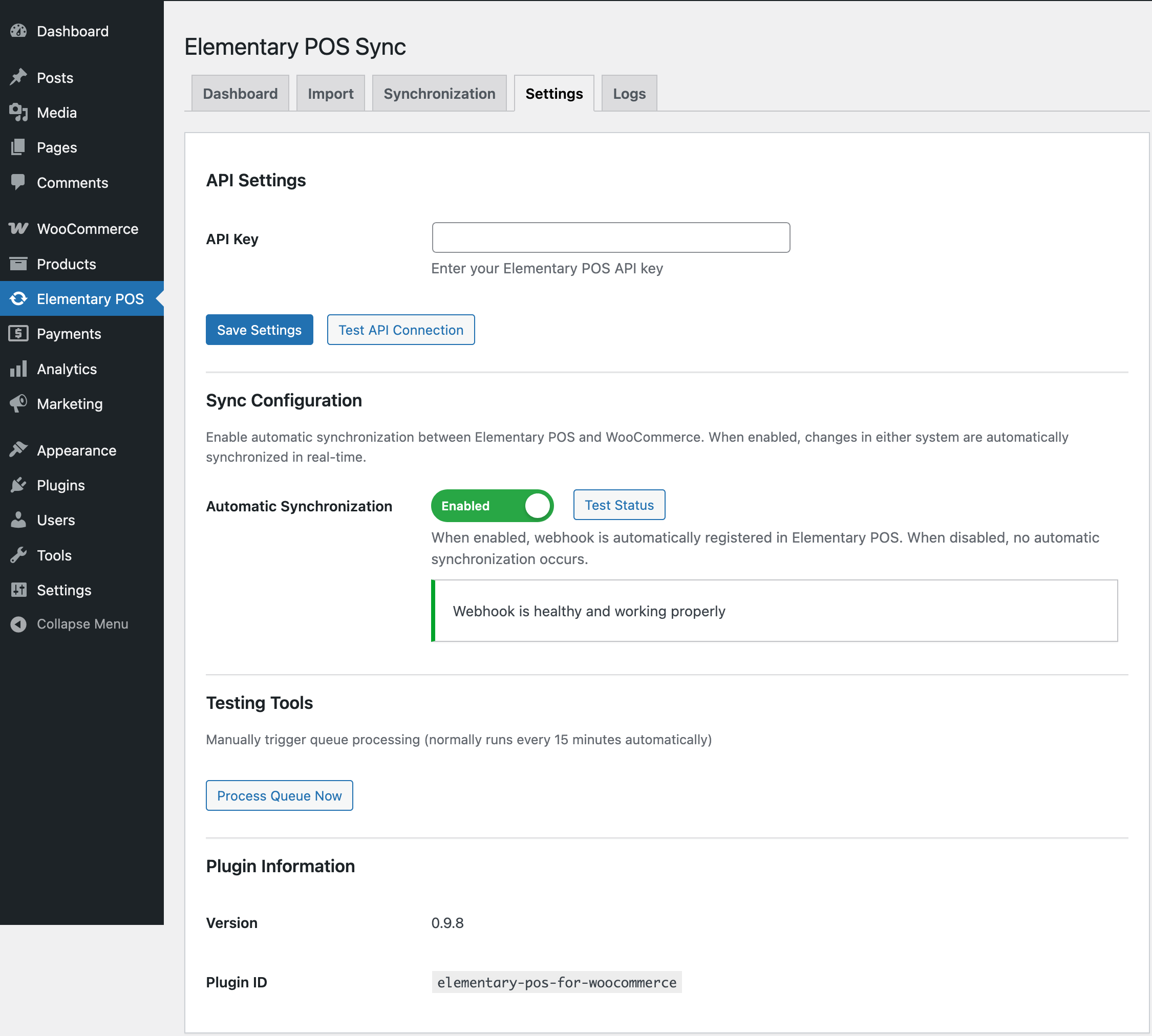

Instalacija
- Install the plugin from WordPress.org (Plugins Add New Search for „Elementary POS“)
- Activate the plugin
- Go to Elementary POS in the WordPress admin menu
- Navigate to Settings tab
- Enter your Elementary POS API key
- Click „Save Settings“ to save the API key
- (Optional) Click „Test API Connection“ to verify the connection
Initial Setup
After installing and configuring your API key, you can start using the plugin:
- (Optional) Import Products: Go to Import tab Load Products Import to bring products from Elementary POS to WooCommerce
- (Optional) Synchronize Stock: Perform initial stock synchronization in either direction (Elementary POS WooCommerce or WooCommerce Elementary POS) from the Synchronization tab
- (Optional) Enable Automatic Synchronization: After performing initial stock synchronization, you can enable automatic synchronization in Settings tab by toggling the switch to ON
- Verify Status: Check the Dashboard to confirm that all settings are configured correctly
Pohódnoćenja
Za tutón tykač pohódnoćenja njejsu.
Sobuskutkowarjo a wuwiwarjo
„Elementary POS for WooCommerce“ je softwara wotewrjeneho žórła. Slědowacy ludźo su k tutomu tykačej přinošowali.
Sobuskutkowarjo
„Elementary POS for WooCommerce“ je so do 1 rěče přełožił. Dźakujemy so přełožowarjam za jich přinoški.
Přełožće „Elementary POS for WooCommerce“ do swojeje rěče.
Na wuwiću zajimowany?
Přehladajće kod, hladajće do SVN-repozitorija abo abonujće wuwiwanski protokol přez RSS.
Protokol změnow
0.9.50
- Improved: Stock keeps in step with the till in three more situations – an order arriving while an earlier change for the same product is still queued, a sale at the till landing while the queue is being processed, and a stock load following an import of only new items
- Fixed: A product sold without tax is now exported to the till without a rate. Only the tax class was read before, so the „No tax assigned“ row in the mapping table had no effect – worth a look at the tax on your exported items if you sell anything tax free
- Improved: Suggested tax mapping now pairs only rates that really match, so a shop on 21% is no longer offered the till’s 20%
- Improved: An import can be started again right after it is cancelled, and the Cancel button stays available for the next run
- Changed: The description now names four limits worth knowing before an import – items without a SKU, SKUs differing only in letter case, till taxes that are not a percentage, and a full synchronization started while the queue still holds something
0.9.49
- Fixed: A variation sold or restocked moved the till item belonging to the whole product, because WooCommerce hands a variation the parent’s SKU when it has none of its own – and nothing ever came back the other way, so the two sides drifted apart in silence. Variations are now left alone in both directions, which the description explains
- Fixed: A variable product was sent to the till as a sellable item at zero, since it carries no price of its own, and every later export wrote that zero back. Variable, grouped and external products are now left out, and the import screen says how many were skipped
- Fixed: A change from the till smaller than a whole unit moved nothing and was still reported as applied. It is now recorded as a warning saying what was dropped
- Fixed: Naming a new product and giving it a quantity in one step raised a warning about a SKU change that had not happened, which made an import of a few hundred products look alarming
- Fixed: The log’s „Yesterday“ showed today as well, and both day filters cut the day at UTC midnight instead of the shop’s
- Fixed: Refreshing the dashboard left the product count with a SKU and both status labels as they were
- Changed: The description said a decimal quantity from the till is rounded up. It is cut down, a change under one unit is dropped entirely, and for anything not measured in pieces that loss is permanent
0.9.48
- Fixed: Changing the quantity of an item on an existing order, or removing the item, moved the shop’s stock but never reached the till
- Fixed: The wait between retries was written in UTC but checked against the database clock, so on most shops it did not apply at all – a till briefly out of reach used up its attempts in minutes instead of over an hour
- Fixed: The note that a movement is still on its way to the till expired sooner than the queue could deliver it, which let the correction against the till put sold goods back on the shelf
- Fixed: Importing wrote the price a customer pays over with the regular price, which quietly ended any sale the product was on – and did it again on every import
- Fixed: In a shop that does not count stock at all, every imported product was created out of stock and nothing could put it back on sale afterwards
- Changed: The list of data sent to Elementary POS left out the export direction, which sends the product’s name, SKU, price, tax, colour and category
- Changed: Six other statements in the description did not match what the plugin does – which orders send stock, how long a failed change is retried, what happens to an item not measured in pieces, why WooCommerce 9.1 is needed, and what the queue keeps
0.9.47
- Fixed: The plugin ran next to a WooCommerce older than 9.1, although 0.9.46 had declared that version as the minimum. The header saying so is only a statement – WordPress does not act on it, and WooCommerce only remarks on it – while the check that does refuse an installation was still asking for 5.0. On such a shop a sale never reached the till and the correction against the till then put the sold goods back on the shelf, which is exactly what raising the minimum was meant to prevent. The plugin now refuses activation and, on a shop where it is already switched on, keeps out of the way and says on every admin screen which version it needs and which one is installed. Nothing is synchronized until WooCommerce is updated
0.9.46
- Fixed: „Move all products to Trash before import“ emptied the catalogue without first checking there was anything to put back. If the products loaded from Elementary POS had expired, or the till answered with nothing, the shop was emptied and the import then stopped with „load products first“. It now refuses and says why, and it will not start while another import is running
- Changed: WooCommerce 9.1 is now the minimum. The hooks that tell the plugin an order changed stock arrived in WooCommerce 7.6 and 9.1, so on anything older a sale in the shop never reached the till – and the correction against the till would then quietly put the sold goods back on the shelf. The plugin says so up front instead
- Fixed: Unticking „Import tax classes“ was ignored and the suggested mapping was written to every product anyway. jQuery leaves an empty mapping out of the request, so „no thank you“ and „nobody asked“ reached the server looking the same
- Fixed: An export could stop with a fatal error when the preview data had expired, because the line that reports an unmapped tax class was handed a boolean instead of a list
- Fixed: The result of a manual stock synchronization printed the same two numbers twice – „1 products updated, 0 failed.“ and then „(Updated: 1, Failed: 0)“ right after it
- Fixed: That same line did not inflect: it said „1 products updated“ instead of „1 product updated“
0.9.45
- Fixed: Stock changed with Bulk Edit in the products list never reached Elementary POS. Bulk Edit does not set the quantity on the product the way every other screen does – it writes it straight to the database – so the plugin never saw it, and raising the stock of fifty products at once left the till on the old figures with nothing to say so. Bulk Edit now reaches the till like any other change made by hand
- Fixed: Cancelling an import did nothing at all in 0.9.44. The button went to „Cancelling…“ and the import stayed there for good, because the script referred to a variable that was no longer declared and stopped on the spot. Anyone who cancelled had to reload the page. Cancelling works again, in every phase
- Changed: The Dashboard said „Total Products in WooCommerce“ and the Import tab said the same words, but the two counted different things – the Dashboard leaves out what is not synchronized – so the same plugin showed two numbers under one label. The Dashboard now says „Products in WooCommerce that are synchronized“
- Changed: Two paragraphs in a row told you to check the suggested tax mapping; now only one does
- Fixed: With „Overwrite category assignment“ ticked, the paragraph underneath still said categories are left as they are, right next to the sentence saying they will be moved
0.9.44
- Fixed: Cancelling an import while stock was being loaded ended with nothing but „Import cancelled by user“, although the run had already moved the synchronization marker to the moment it started reading. The products it never reached keep their old quantities and no update from the till will put them right, so the message now says so and points at the full synchronization that repairs it. The same note is added when stock loading stops on an error that does not explain this itself
- Fixed: The stock comparison counted draft products as „Products only in Elementary POS“, sending the shop owner looking for a product that is sitting in the shop – it is simply a draft, and drafts are left out of synchronization unless that is turned on. They now have a line of their own in both directions
0.9.43
- Fixed: Refunding an order with „Restock refunded items“ raised the quantity in WooCommerce but never told Elementary POS, and nothing put it right afterwards – the two sides stayed apart until somebody ran a manual synchronization. WooCommerce announces a refund restock with a hook of its own, which the plugin was not listening to, and the general one it does listen to cannot see this change at all. Stock put back by a refund now reaches the till the same way stock from a cancelled order already did
0.9.42
- Fixed: A stock movement for a product Elementary POS does not carry was queued and retried for good. Every stock change in the shop put recently failed items back in the queue and moved their timestamp along with them, so the twenty-four hour limit never ran out and the till was asked the same unanswerable question on every sale. A movement Elementary POS refuses outright – it has no such SKU, or the unit means nothing to it – is now recorded once and left alone, while anything that failed because the till was out of reach is still retried exactly as before. One thing to know: if a refusal was caused by an API key belonging to a different Elementary POS account, run a manual stock synchronization once the key is put right, because those movements are no longer retried on their own
0.9.41
- Fixed: A sale or a stock-up at the till could be counted twice in WooCommerce. Elementary POS hands out stock movements by time, and the boundary it uses takes in the very second it reports back – so a movement recorded in the same second the plugin asks for it, which is the ordinary case because the till calls the moment it happens, is handed out once more on the next call, blended into a larger figure with nothing in it to mark the repeat. After applying the movements the plugin now reads the quantity the till actually holds for the items that moved and sets that, which puts right a movement handed out twice as well as one that failed to stick. The quantity is only written where nothing else has touched that product in the meantime and where this shop has no movement of its own still on its way to the till, so an order taken while this runs is never undone
0.9.40
- Fixed: Importing overwrote the stock of products this shop does not count stock for – services, vouchers, made-to-order items. An item standing at zero in Elementary POS turned every one of them „out of stock“ on each import, and an item with stock put a deliberately unavailable one back on sale. Such products are now left exactly as they are, the way the automatic and manual synchronizations already left them, and the import says how many it stepped around
- Fixed: A manual synchronization from Elementary POS that ran out of time half way left part of the catalogue holding the new quantities while the record of how far it had got still pointed at the old position, so the next automatic update added those movements a second time. That record is now written before the first product, and put back if the run has to be undone
- Fixed: Both manual stock synchronizations ran without a raised time and memory limit, so on a larger shop they could stop in the middle with no message at all
- Fixed: The settings page reported every webhook fault as „Unknown error“ because the explanation from Elementary POS was being discarded, and a shop that had never registered a webhook was told its status was unknown instead of simply that there is none yet
- Fixed: An error while loading the Stock Overview showed nothing at all – the message never reached the screen
- Fixed: A failed import chunk left the „an import is already running“ flag standing for five minutes, refusing every further attempt
- Fixed: Stock synchronization now says plainly that it cannot run when WooCommerce stock management is switched off shop-wide, instead of quietly skipping every product while recording the work as done
0.9.39
- Fixed: A sale made at the till while an import was loading stock could be counted twice. The loading phase now keeps its hold on the stock for the whole of its run instead of letting go between batches, and it marks how far it has synchronized before it writes the first product rather than after the last
- Fixed: An import cancelled or interrupted while stock was loading left part of the catalogue with quantities from Elementary POS but no record of how far it had got. On a shop that had never synchronized, the next automatic update then added the entire history of stock movements on top of what had just been written
- Fixed: A second import started while the first was still loading stock was let through and took over the list of products the first one was working on
- Fixed: Synchronizing stock to Elementary POS used the figures from the moment Load was pressed, however long ago that was, so a sale made in between was overwritten and a sale made at the till was skipped and then never collected. Both sides are now read again at the moment you confirm the synchronization
- Fixed: A product that exists only in WooCommerce and not in Elementary POS counted as a failure and held back the synchronization marker for good – including on a first synchronization, where it left automatic synchronization impossible to switch on
- Fixed: A stock change from Elementary POS that could not be written to any product – no product with that SKU, stock not tracked, the write failed – was dropped without a trace and never offered again. The dashboard now lists what did not arrive and why, and a full synchronization from Elementary POS clears it
- Fixed: If applying a batch of stock changes broke off part way, the retry found nothing left to do and reported success, losing the rest of the batch silently
- Fixed: A failed attempt to switch automatic synchronization on replaced the secret the till had already been given, so every update from the till was refused from then on and synchronization died quietly
- Security: Automatic synchronization set up by a version older than 0.9.19 has no secret protecting it, so anyone could trigger stock updates. Such a webhook is now accepted at most once a minute, an administration notice asks you to switch synchronization off and on again, and after thirty days unprotected requests are refused
- Improved: Loading stock during an import no longer searches the whole history of stock movements once per product, which makes it much faster on a shop with a long history
0.9.38
- Fixed: Turning stock tracking on for a product and entering a quantity sent that whole quantity to Elementary POS as if the goods had just arrived, moving the item’s stock by that amount. Starting to count is not a stock movement, and a quantity with nothing to compare it against is no longer sent at all
- Fixed: The stock overview showed a quantity of zero for products whose stock is not tracked, as though they held nothing; it now leaves the figure empty and says why
- Fixed: The stock overview called a product „not in WooCommerce“ when it was there as a draft and simply not being synchronized
0.9.37
- Added: A Stock Overview tab showing what Elementary POS and WooCommerce hold for every product side by side, with the difference and, where a product cannot be synchronized at all, the reason – no SKU, stock not tracked, or a unit other than pieces. Filter by what you want to see and search by name or SKU. Nothing is changed from this screen
- Added: The synchronization summaries link to the overview, so the counts can be turned into a list of actual products
- Improved: The overview asks Elementary POS for current stock levels directly instead of adding up the whole history of stock movements, so it stays fast in a shop that has been running for years
0.9.36
- Fixed: Synchronizing stock to Elementary POS sent a quantity of zero for every product whose stock this shop does not track, wiping the stock of services, vouchers and anything else with stock management turned off. Such products are now left alone and counted separately
- Fixed: Tax included in the price – the usual way VAT is entered here – was not recognised as a percentage tax, so those rates were never matched and had to be mapped by hand in both directions. The mapping table now says which of the two kinds a rate is
- Fixed: Changing the API key switched the webhook off on the newly connected account instead of the one being left, so the old account kept calling this site
- Fixed: Testing an API key stored it in the database for the duration of the test, so a timeout in the middle left somebody else’s key saved
- Fixed: Exporting a product repainted its colour in Elementary POS on every run; the colour the item already has is kept
- Fixed: A second import was refused only after it had already written its first fifty products
0.9.35
- Fixed: Import, both manual synchronizations and the webhook each had their own lock, so they never excluded one another – two of them could work from different snapshots of the stock and the one finishing later silently undid the other’s work. They now share a single lock and take turns
- Fixed: The stock loading phase of an import held no lock at all, even though it writes quantities for the whole catalogue
- Fixed: Starting a second import while one is running is refused with an explanation instead of the two interleaving
- Improved: A long job now waits a few seconds for the lock rather than giving up, so an import is no longer interrupted by a webhook that holds it for an instant. A webhook that cannot get in is queued and retried, so the sale behind it is not lost
0.9.34
- Added: Products that Elementary POS would refuse because their name is already taken are now listed before the export runs, with the reason for each, so the names can be corrected instead of the products turning up as failures afterwards
- Improved: When Elementary POS refuses a product anyway, the reason it gave is now shown with the result instead of a bare „error 400“ hidden in the log
0.9.33
- Fixed: Changing a product’s SKU and its stock in one save sent the stock difference to Elementary POS under the new SKU, even though it was measured against the old one – if that SKU belonged to another item, the change landed on its stock. Such a save no longer sends anything and says so in the log
- Fixed: The list of products waiting for stock to be loaded was only cleared once loading finished, so a cancelled import left it behind for the next run to add to
- Fixed: The settings page reported a broken response from Elementary POS when simply no webhook was registered yet – the state every installation starts in
- Removed: The import rollback, which permanently deleted everything created in a batch. Since a failing item is skipped rather than aborting the whole import, nothing called it any more
0.9.32
- Fixed: Products standing at zero in Elementary POS were left out of the stock comparison altogether, because Elementary POS reports stock as movements and an item that never moved has none. A wrong quantity in the shop for such a product was never reported and no manual synchronization would correct it
0.9.31
- Fixed: The preview of products whose category differs ignored products filed under the Elementary POS category plus categories of your own. Overwriting removes those extra categories, so they are now listed among the affected products instead of being counted as no difference
0.9.30
- Fixed: A single item that could not be imported stopped the whole import and permanently deleted every product created in that batch. Two Elementary POS items sharing one SKU were enough to trigger it. Such an item is now skipped and reported, and the rest of the catalogue imports normally
- Fixed: Importing from an empty Elementary POS catalogue reported „Phase 2 failed“ instead of simply saying there is nothing to import
- Fixed: An item arriving without a name no longer produces a PHP warning and a product with an empty title; it gets a placeholder name and a line in the log
Older entries have been removed to stay within the length WordPress.org displays.