WordPress.org

Hornjoserbšćina

  • Drasty
  • Tykače
  • Wo
  • Get WordPress
Get WordPress
WordPress.org

Plugin Directory

OTP Login Woocommerce (Login with OTP)

  • Submit a plugin
  • My favorites
  • Log in
  • Submit a plugin
  • My favorites
  • Log in

OTP Login Woocommerce (Login with OTP)

Wot xootix
Sćahnyć
  • Podrobnosće
  • Pohódnoćenja
  • Instalacija
  • Wuwiće
Podpěra

Wopisanje

Live Demo
Allow users to login/signup with one time password(OTP) sent on your mobile device.

Features And Options:

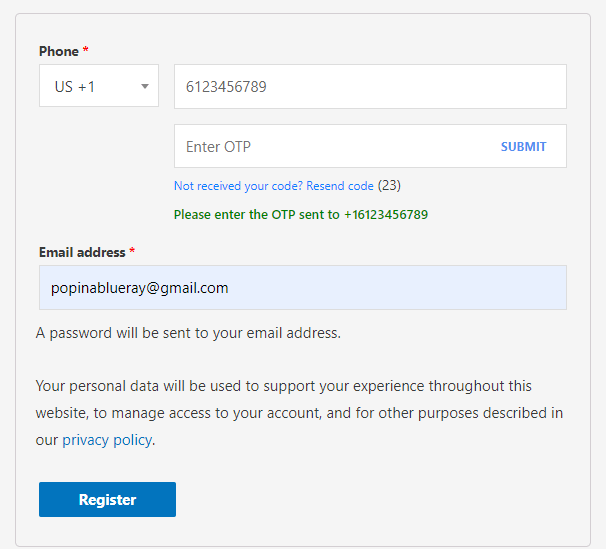
  • Adds a phone number field to the signup form
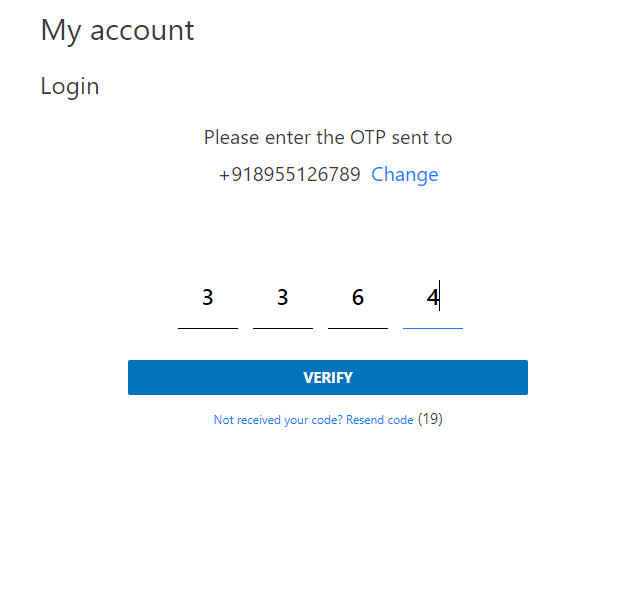
  • No need to remember email/password, login with OTP
  • Fully customizable
  • Woocommerce Compatible
  • Fully Ajaxed.

Third Party Services

This plugin uses third party services to send SMSs

SMS Operators available:

  • Firebase ( Free messages )
  • Twilio
  • Amazon
  • SMS Alert, MSG91, Textlocal, Unifonic and others..

For detecting country code, plugin uses API endpoints for looking up user IP address. This is optional and can be disabled from the settings
Options available
ipify, ipecho, ident, whatismyipaddress

Pro Features:

  • Login with Email OTP.
  • Two Factor Authentication – SMS/Email
  • Validate and verify phone number in checkout form before customer places an order.
  • Register with a single click. Email & Password less registration.
  • Manage registration fields.
  • Popup & inline form design ( Try here)
    https://wordpress.org/plugins/easy-login-woocommerce/
  • Show the countries‘ flags

Documentation

Documentation

Fota wobrazowki

  • Banner

Instalacija

  1. Upload the plugin files to the `/wp-content/plugins/ directory, or install the plugin through the WordPress plugins screen directly.
  2. Activate the plugin through the ‚Plugins‘ screen in WordPress
  3. Click on Login/Signup Popup on the dashboard.

HSP

How to setup?

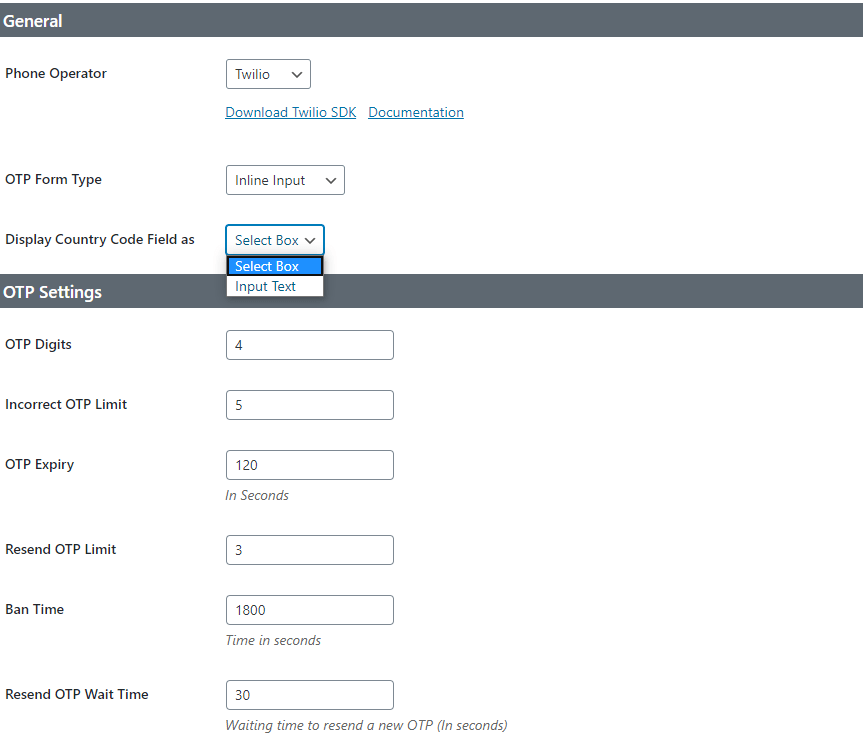
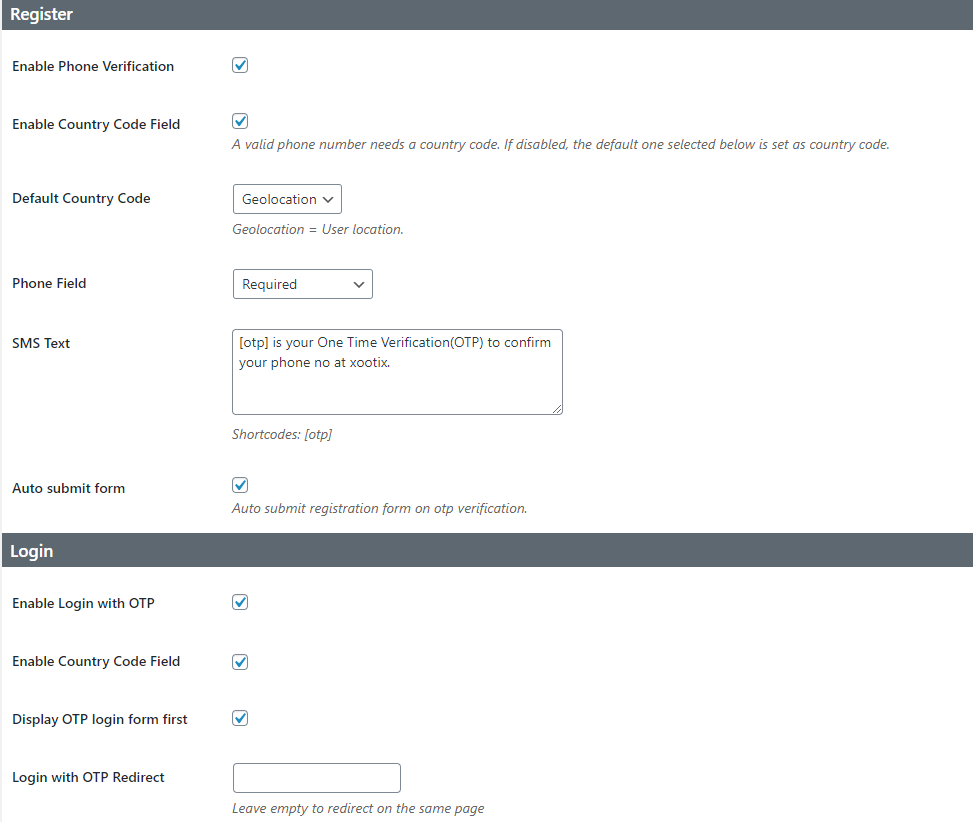
  1. Go to plugin settings.
  2. You need a third party service to send SMS, select the desired one.
  3. Please read the documentation to get API keys.

How to translate?

It is recommended to use plugin „Loco Translate“. Below is the manual way.
1. Download PoEdit.
2. Open the mobile-login-woocommerce.pot file in PoEdit. (/plugins/mobile-login-woocommerce/languages/
mobile-login-woocommerce.pot)
3. Create new translation & translate the text.
4. Save the translated file with name „mobile-login-woocommerce-Language_code“. For eg: German(mobile-login-woocommerce-de_DE)
, French(mobile-login-woocommerce-fr_FR). — Language code list
5. Save Location: Your wordpress directory/wp-content/languages/

How to override templates?

Plugin template files are under mobile-login-woocommerce/templates folder.
Copy the template file to your theme->templates folder and make the desired changes there.

Pohódnoćenja

Brilliant add-on with extensive features

steffiscloud 19. julija 2025
This plugin is stunning – it not only uses email and phone but also 2FA with Authenticator App – this makes your login very secure. In conjunction with the other add-ons – you will have a full featured login feature, which you can customize to your likings. _____________________________________________________________________ Dieses Plugin ist atemberaubend – es verwendet nicht nur E-Mail und Telefon, sondern auch 2FA mit Authenticator App – das macht Ihr Login sehr sicher. In Verbindung mit den anderen Add-ons haben Sie eine vollwertige Login-Funktion, die Sie nach Ihren Wünschen anpassen können.

Awesome Support

rahulsg 5. junija 2025
The plugin usage is straight forward and easy to understand and use, along with quick and efficient support from the team. Got reply for my query in like 5 Mins with the resolution and can say this is the best OTP plugin for your Woocommerce Store.

Great Work

guru1970 29. oktobra 2024
It is very useful. Great work. Overall support is fantastic.

Best Plug in and Service

vis2012 17. septembra 2024
One of the best plugin for otp function and service also exellent

Amazing plugin and awesome support

ThePhysicist 26. awgusta 2024
I have been using this plugin for years along with a fe of its premium addons. Everything works great as advertised. In case of any issues, I have always received the prompt support of the developers.

Support is amazing

bvolts 12. awgusta 2024
This plugin is fantastic! It greatly enhances my workflow with its superb functionality. The support team is also exceptional—knowledgeable, responsive, and extremely helpful. Highly recommended for its quality and stellar customer service!
Čitajće 44 pohódnoćenjow

Sobuskutkowarjo a wuwiwarjo

„OTP Login Woocommerce (Login with OTP)“ je softwara wotewrjeneho žórła. Slědowacy ludźo su k tutomu tykačej přinošowali.

Sobuskutkowarjo
  • xootix
  • xootixsupport

Přełožće „OTP Login Woocommerce (Login with OTP)“ do swojeje rěče.

Na wuwiću zajimowany?

Přehladajće kod, hladajće do SVN-repozitorija abo abonujće wuwiwanski protokol přez RSS.

Protokol změnow

2.6.9

  • Woodmart theme compatibility
  • Minor fixes
  • Settings UI update

2.6.8

  • Custom SMS operator settings fix
  • Settings UI update

2.6.7

  • New – added Authorization fields for custom SMS gateway.
  • Fix – copy paste OTP for external form type
  • Template update – xoo-ml-external-otp-form.php and xoo-ml-inline-otp-input.php

2.6.6

  • New – added JSON data format for custom SMS gateway

2.6.5

  • Fix – args not showing in debug

2.6.4

  • Fix – PHP 8.1 compatibility warning

2.6.3

  • New – Custom SMS gateway option
  • Fix – Amazon region option

2.6.2

  • New – SMS Operators – SMSLane, Semaphore
  • Fix – non numeric characters in phone field
  • Fix – Security

2.6.1

  • Fix – MSG91 missing parameter

2.6

  • New – Option to export/import settings
  • New – Restrict country codes
  • New – SMS operator – Bulksms
  • Fix – MSG91 not working

Template update => xoo-ml-phone-input.php

2.5.1

  • New SMS operators – MSG91, Textlocal
  • Update – changed phone field from text to tel
  • RTL style fix

2.5

  • Added SMS Operators

2.4

  • New Settings UI

2.3

  • Fix – Security issues

2.2

  • New – Added option to auto remove 0

2.1

  • Fix – Security issues

2.0

  • New – Inline input for OTP Verification
  • New – Country code for login form
  • New – Improved country code select field
  • New – Phone number column on users page
  • Tweak – Design improvement

1.4

  • Fix – Geolocation not working
  • Fix – Conflict with dokan
  • Fix – Other minor fixes

1.3

Fix – Phone code not showing

1.2

Fix – Disable OTP registration

1.1

  • Add – Twilio Service
  • Add – (Option) auto signup on verification
  • Add – (Option) – display OTP form first
  • Tweak – Slight changes in design

1.0.0

  • Initial Public Release.

Meta

  • Version 2.6.9
  • Last updated 4 měsacy
  • Active installations 2.000+
  • WordPress version 3.0.1 abo nowši
  • Tested up to 6.8.3
  • PHP version 5.2.4 abo nowši
  • Language
    English (US)
  • Tags
    loginphoneregistersmswoocommerce
  • Rozšěrjeny napohlad

Pohódnoćenja

4.6 out of 5 stars.
  • 39 5-star reviews 5 stars 39
  • 0 4-star reviews 4 stars 0
  • 0 3-star reviews 3 stars 0
  • 1 2-star review 2 stars 1
  • 4 1-star reviews 1 star 4

Moje pohódnoćenje přidać

See all reviews

Sobuskutkowarjo

  • xootix
  • xootixsupport

Podpěra

Rozrisane problemy zańdźeneju dweju měsacow:

0 z 2

Forum pomocy pokazać

Darić

Chceće dalewuwiwanje tutoho tykača podpěrać?

Za tutón tykač darić

  • About
  • News
  • Hosting
  • Privacy
  • Showcase
  • Themes
  • Plugins
  • Patterns
  • Learn
  • Support
  • Developers
  • WordPress.tv ↗
  • Get Involved
  • Events
  • Donate ↗
  • Five for the Future
  • WordPress.com ↗
  • Matt ↗
  • bbPress ↗
  • BuddyPress ↗
WordPress.org
WordPress.org

Hornjoserbšćina

  • Visit our X (formerly Twitter) account
  • Visit our Bluesky account
  • Visit our Mastodon account
  • Visit our Threads account
  • Visit our Facebook page
  • Visit our Instagram account
  • Visit our LinkedIn account
  • Visit our TikTok account
  • Visit our YouTube channel
  • Visit our Tumblr account
Kod je poezija.