
Wopisanje
Always active functions
- Added „bbpress user“ (bbp_user) to user role. (same capabilities as subscriber)
- Ajax form template with Login / Signup / Lost password.
- Record login date and time of bbpress user.
- bbpress user forbids access to Admin’s Dashboard and Profile edit page.
- Display link to forum root on Admin bar menu.
- Create anonymous user for replacing posting data of unsubscribe user.
- Load Japanese font designation CSS to TinyMCE editor used for posting.
Option functions
- Auto role of bbpress user. (Used in place of „Auto role“ setting of bbpress plugins. Set the forum role only to bbpress user)
- Login from wp-login page of bbpress user is redirected to forums root page.
- If it contains „code“ tag to the post, replacing it with „pre“ tag
- If the post does not contain Japanese treats as spam.
- Spam posts containing images that are larger than the set number.
- Spam posts containing embedded (YouTube / Twitter / Flickr etc) more than the set number.
- To Widget of Recent Topics and Recent Replies. Mark up the author in div tag, and easy to read Japanese display.
- Delete account that has never been used within the specified number of days after new registration.
- Delete account that has not been recently logged in. (User posted data is replaced with anonymous)
- Forum unsubscribe function. (Place the link for the „unsubscribe“ in the forum of the user profile page. However, forum role is only to Participant or Spectator of bbpress user.)
Note
- The usage that this plugin is supposed to use is Forum operation with member registration system using bbPress.
- Many features of this plugin depend on the newly created „bbp_user“ role.
- Registered automatically by „bbp_user“ role by user registration using bbPress short code „bbp-register“.
- To use it in multi-site, please enable it with „Network Plugins“. If you activate it with „Site Specific Plugins“, some functions will not work.
If you introduce this plug-in to an existing forum later, you must manually change the user role from „Subscriber“ to „bbpress user“. Please note that it is only for the „Subscriber“ user to change, so please do not mistake it.
For details, please see the link page below. (Because it is a document in Japanese, please use Google translation etc. when you want to refer in your native language)
Fota wobrazowki
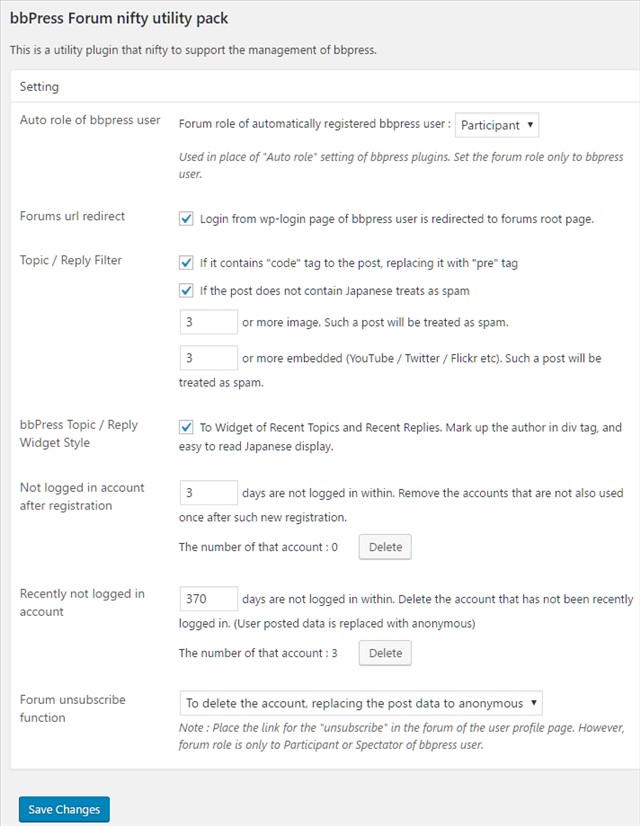
bbPress forum utility pack setting. 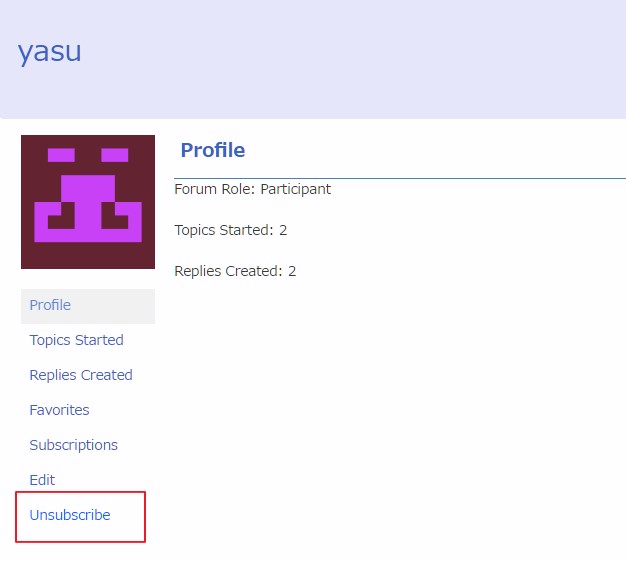
Forum unsubscribe link
Instalacija
- Upload the
bbp-jp-utilityfolder to the/wp-content/plugins/directory. - Activate the plugin through the
Pluginsmenu in WordPress - Set up from
bbPress Utilityto be added to the Settings menu of Admin mode.
Pohódnoćenja

18. apryla 2017
投稿制限機能を使っています
I am using post restriction function
Sobuskutkowarjo a wuwiwarjo
„bbPress forum utility pack“ je softwara wotewrjeneho žórła. Slědowacy ludźo su k tutomu tykačej přinošowali.
Sobuskutkowarjo
Přełožće „bbPress forum utility pack“ do swojeje rěče.
Na wuwiću zajimowany?
Přehladajće kod, hladajće do SVN-repozitorija abo abonujće wuwiwanski protokol přez RSS.
Protokol změnow
1.1.0
- 2024-4-15 Fix PHP deprecated notice
- Change Ajax(jQuery) to fetch(js)
- refactoring and sanitization
1.0.2
- 2020-7-1 Fixed a bug where
bbp-loginshortcode was not workin. - Changed conditions to PHP7.2 or more.
1.0.1
- 2020-4-20 Added support for use with login captcha judgment plugin.
- validated plugins (reCaptcha by BestWebSoft v1.56 / Invisible reCaptcha v1.2.3 / Advanced noCaptcha & invisible Captcha v5.6 / SiteGuard WP Plugin v1.5.0)
- change: The initial value of column sort order of ‚Registration date‘ and ‚Last login‘ of user list screen is changed to descending order.
- fix: Changed the processing of dialog, because an error was occurring when using jQuery3.
0.9.2
- 2020-2-3 Fix PHP error when get_option(‚timezone_string‘) is empty data.
0.9.0
- 2019-11-28 Support WP5.3 and bbPress v2.6
0.8.3
- 2018-7-6 Fixed a bug that sometimes the forum authority is not set in user registration.
0.8.2
- 2017-11-29 Fixed bug that sometimes the wrong post_id is displayed on the post edit screen.
0.8.1
- 2017-11-01 Support Topic count, Reply count, Last Login sort on user screen.
0.8.0
- 2017-10-31 Topic, Reply count, registration date, last login display to Users on the management screen. And Pop up Recent Topic, Reply in Admin Bar.
0.7.4
- 2017-08-21 Version 0.7.4 Fixed bug that favorites etc could not be used.
0.7.3
- 2016-11-29 Version 0.7.3 release